Thursday, 1 July 2010

VMWare Player vs. Server, vs. Virtual Box

Virtualization is great. It is very handy to have your complex installations of server software in a Virtual Machine. I do it for years and have only some client tools that do need a complex installation on my host. JDeveloper, SQLDeveloper or Pl/Sql Developer for instance. It enables you to reinstall your laptop and be up and running after having installed your virtualization product. Provided that you backup your VM's of course. Also I have a Windows based VM with some tools for administration purposes.

I started years ago with VMware Workstation 3 to 5.x. But then VMware Server came out. And back then workstation did not provide much extra above Server. And although I had a demo license for Workstation (which ended), Server was for free. Actually the only missing feature in Server I encountered was 'Shared Folders'. But that I solved using (S)Ftp. Under windows it is very convenient to have a FileZilla Server. You could solve it by defining a share in Windows. But I found that that gives some problems when you have multiple copies of a VM running on the same network. Then you have to change your host name, etc. And it is problematic if you have multiple shared open in multiple VM's while your windows account have a regularly changed password. So shared folders as an alternative to FTP is not necessary but very convenient.

Shortly after VMware Server VMware Player came out. But until today it was not possible to create new VM's in Player. And that is a 'must have' to me.

VMware 2.0 was a large step for me since I found it astonishing that the footprint from 1.0 grew by a factor 5! But since VMware dit not keep 1.0 up with the Linux Kernel changes, I did the upgrade. Now I was a pretty satisfied VMware Server user.

But there are two problems now with VMware Server 2.x.:
  • VMware Server 2.x does not keep up with the Linux kernel changes either. I upgraded to OpenSuse 11.2, which worked very well. But stepped back to 11.1 since VMware Server did not install with that kernel.
  • Since FireFox 3.6 the VMware Console does not work anymore. This is solvable by installing a seperate FF 3.5.9 for VMware usage. But this is very inconvenient.
Lately I tried Virtual Box again because of the Firefox problems and I reported to be very enthousiastic about it. And indeed it is a very good product. But unfortunately most of my VM's are VMware based. It is possible to run a VM in virtual box based on VMware files. But you have to create a new Virtual Box VM for that purpose that refer to the VMware files. And than you have to de-install the VMware Tools (which probably have installed in that VM) and install VirtualBox GuestAdditions. It's all doable and no rocket-science. But it's not a simple import-and-run.

But since 25th of may VMware Player 3.1 was released. And apparently Vmware released it as an answer to the Windows XP mode on Windows 7. To run older Windows XP compatible apps in Windows 7. But it occurs to me that they've looked closely to VirtualBox. The VMware Unity mode is quite comparable or actually the same as the Seamless Windows mode of VirtualBox. This is a very attractive feature that makes VMware Player as well as VirtualBox suitable to beat the Windows XP mode of Windows 7. I have not be able to try the XP mode of Windows 7. So I don't know about load times of the XP mode. But for VirtualBox and VMware Player you need to start the guest Windows to be able to use it. And you have to have an activated version of Windows in your VM.

And since VMware Player 3.1 I'm able to create VM's in Player. Actually, with being able to create VM's in Player and with the 'Shared Folder' feature I think you might say that Player is on the 'must-have'-feature-level of VMware Workstation 5.5. And since Player has a smaller foot print (100MB, about the same as Server 1.0.x) and does not need to have an Apache Tomcat running, no need for browser access of the console: VM's running in a seperate application window, Player is a very much better suitable for running VM's on a laptop/desktop. And a feature like VMware Unity/VirtualBox Seamless Windows mode is really nice. It is funny to have windows applications running in a window side by side with your Linux apps. Even copy and paste works. And having shared folders makes it possible to have your Guest-OS apps work with the same files as your host OS apps.

And what made me most lyric? I had my OpenSuse 11.1 connected to a beamer. In the NVidia conrols I had the CRT (as NVidia/X called it) placed right of my LCD desktop. Then I placed my PowerPoint in Unity on the Beamer area of the desktop (so I was able to see other apps on my lcd screen). And then it played the slideshow fullscreen on the beamer...
I was very happy about it, because I had PowerPoint 2007 working under Wine. But editing a file under PowerPoint2007/wine was not doable. Whey drag and drop or move an object on the canvas the canvas becomes black until you release the object. Only then it draws again. But in the VMware Unity mode, PowerPoint 2007 is usable under Linux!

To conclude, when to use what? A question I try to answer a lot lately.
  • If you want to run VMware VM's on your own laptop along with other apps, use VMware Player
  • If you want to run MS-Office 2007 or other Windows apps side by side with other applications on your Linux machine, use either VMware Player with Unity or Virtual Box with Seamless Windows mode (you may choose). But you should try if the app works properly enough under Wine, since that will give you much faster startup times and lower system-load, since you do not have to load Windows as a guest os.
  • If you want to run VM's on a host that has to be reachable from different location, then use VMware Server. For example, if you have a spare desktop on the attick that you want to leverage for different purposes, then use Server. With server you can start, stop and use the VM-desktop using a browser. Unfortunatly it has to be a FireFox 3.5 at most, for the current Server version (2.x).
  • If you look for an enterprise solution, look at Oracle VM or VMware ESX and their management products. These solutions are beyond my use. Since they run on 'bare-metal', and that is out of the question for me.
I don't have particular arguments for the choice between VirtualBox and VMware Player. There are other virtualization tools like KVM or Xen based. There are people that favor a particular solution over VMware because of performance. Especially the VMware would not be that fast in IO-operations. But I haven't seen any benchmarks that support this. I haven't done any measurements in particular but I did not experience any particular performance differences between VirtualBox and VMware. The only reason actually that I favor VMware is just that most of my VM's are based on VMware.

But I sincerely hope that Oracle works on improving both Oracle VM and VirtualBox in a way that get both products in line with eachother and eventually let both products work with the same VM-architecture. Then it would be able to use Oracle VM's on both Oracle VM and VirtualBox. Maybe that would be an extra stimulus to build VirtualBox/Oracle VM appliances.

Wednesday, 16 June 2010

Oracle Inserts based on DB2 selects

It's been a while that I wrote an article. This week I struggled with creating insert scripts based on data from DB2 to be used in my local test database (Oracle XE) at my customer.

We use Siebel and have to integrate here and there by querying data from the Siebel DB2 database. It turns out that my local database adapter has trouble with connecting to the DB2 database. Could not find out what's wrong, so I decided that I would query the data from the Siebel tables and insert it into my local XE database. It's faster anyway (in my case) and it also allows me to manipulate the data for test-case purposes.
But querying db2 to generate insert statements isn't as obvious as I would do it in Oracle.

Here is an example script.

select
'Insert into CONTACT (PARTYROWID,KLANTID,KLANTTYPE,AANGEMAAKTOP,BANKCODE,BANKLOCATIE,KLANTSTATUS,CORRESPONSDENTIETAAL,PRIMAIRTELEFOONNUMMER,'
|| 'PRIMAIRTELEFOONTYPE,PRIMAIREMAIL,PRIMAIREMAILFORMAAT,TELEFOONPRIVE,TELEFOONOVERIG,TELEFOONMOBIEL,TELEFOONWERK,FAX,EMAIL,EMAILFORMAAT,EMAILDATUM,'
|| 'EMAILBRON,INGEZETENEVAN,NATIONALITEIT,ACHTERNAAM,VOLLEDIGEACHTERNAAM,ROEPNAAM,GESLACHTSNAAM,VOORLETTERS,VOLLEDIGEVOORNAMEN,ACADEMISCHETITEL'
||',TUSSENTITEL,ACHTERVOEGSEL,ACHTERTITEL,VOORVOEGSEL,VOORVOEGSELGESLACHTSNAAM,GEBOORTDATUM,GESLACHT,GEBOORTELAND,GEBOORTEPLAATS,EIGENHUIS,FAILLIET,SAMENLEVINGSVORM'
||',BURGERLIJKSTAAT,HUW_VOORWAARDEN,PERSONEEL,TYPEKLANT,MAATSCHAPPELIJKESTATUS,LOKALEKLANTINDELING,CENTRALEKLANTINDELING,KLANTINDELING,LOKAALINGEDEELD,BEHOEFTEPROFIEL,'
||'TAXIDENTIFICATIONNR,WOONPLAATSVERKLARING,SOFINUMMER,REDENGEENSOFINUMER,DATUMOVERLIJDEN,OVERLEDEN,AARDIDENTIFICATIEDOC,DATUMLEGITIMATIE,NRIDENTIFICATIEDOC,'
|| 'DATUMUITGIFTE,LANDUITGIFTE,PLAASTUITGIFTE,PERTELEFOONBENADEREN,PEREMAILBENADEREN,PERPOSTBENADEREN,PERSMSBENADEREN,PERFAXBENADEREN,INSOLVENCYSTATUS,IKBNUMBER)'
||' values ('
|| ''''|| coalesce(ctt.PARTYROWID,'') ||''','
|| ''''|| coalesce(ctt.KLANTID,'') ||''','
|| ''''|| coalesce(ctt.KLANTTYPE,'') ||''','
|| case when ctt.AANGEMAAKTOP is not null then 'to_date('''||varchar_format( ctt.AANGEMAAKTOP,'YYYY-MM-DD HH24:MI:SS')||''',''YYYY-MM-DD HH24:MI:SS'')' else 'null' end ||','
|| ''''|| coalesce(ctt.BANKCODE,'') ||''','
|| ''''|| coalesce(ctt.BANKLOCATIE,'') ||''','
|| ''''|| coalesce(ctt.KLANTSTATUS,'') ||''','
|| ''''|| coalesce(ctt.CORRESPONSDENTIETAAL,'') ||''','
|| ''''|| coalesce(ctt.PRIMAIRTELEFOONNUMMER,'') ||''','
|| ''''|| coalesce(ctt.PRIMAIRTELEFOONTYPE,'') ||''','
|| ''''|| coalesce(ctt.PRIMAIREMAIL,'') ||''','
|| ''''|| coalesce(ctt.PRIMAIREMAILFORMAAT,'') ||''','
|| ''''|| coalesce(varchar(ctt.TELEFOONPRIVE),'') ||''','
|| ''''|| coalesce(varchar(ctt.TELEFOONOVERIG),'') ||''','
|| ''''|| coalesce(varchar(ctt.TELEFOONMOBIEL),'') ||''','
|| ''''|| coalesce(varchar(ctt.TELEFOONWERK),'') ||''','
|| ''''|| coalesce(varchar(ctt.FAX),'') ||''','
|| ''''|| coalesce(varchar(ctt.EMAIL),'') ||''','
|| ''''|| coalesce(varchar(ctt.EMAILFORMAAT),'') ||''','
|| case when ctt.EMAILDATUM is not null then 'to_date('''||varchar_format( ctt.EMAILDATUM,'YYYY-MM-DD HH24:MI:SS')||''',''YYYY-MM-DD HH24:MI:SS'')' else 'null' end ||','
|| ''''|| coalesce(EMAILBRON,'') ||''','
|| ''''|| coalesce(ctt.INGEZETENEVAN,'') ||''','
|| ''''|| coalesce(ctt.NATIONALITEIT,'') ||''','
|| ''''|| coalesce(ctt.ACHTERNAAM,'') ||''','
|| ''''|| coalesce(ctt.VOLLEDIGEACHTERNAAM,'') ||''','
|| ''''|| coalesce(ctt.ROEPNAAM,'') ||''','
|| ''''|| coalesce(ctt.GESLACHTSNAAM,'') ||''','
|| ''''|| coalesce(ctt.VOORLETTERS,'') ||''','
|| ''''|| coalesce(ctt.VOLLEDIGEVOORNAMEN,'') ||''','
|| ''''|| coalesce(ctt.ACADEMISCHETITEL,'') ||''','
|| ''''|| coalesce(ctt.TUSSENTITEL,'') ||''','
|| ''''|| coalesce(ctt.ACHTERVOEGSEL,'') ||''','
|| ''''|| coalesce(ctt.ACHTERTITEL,'') ||''','
|| ''''|| coalesce(ctt.VOORVOEGSEL,'') ||''','
|| ''''|| coalesce(ctt.VOORVOEGSELGESLACHTSNAAM,'') ||''','
|| case when ctt.GEBOORTDATUM is not null then 'to_date('''||varchar_format( ctt.GEBOORTDATUM,'YYYY-MM-DD HH24:MI:SS')||''',''YYYY-MM-DD HH24:MI:SS'')' else 'null' end ||','
|| ''''|| coalesce(ctt.GESLACHT,'') ||''','
|| ''''|| coalesce(ctt.GEBOORTELAND,'') ||''','
|| ''''|| coalesce(ctt.GEBOORTEPLAATS,'') ||''','
|| ''''|| coalesce(ctt.EIGENHUIS,'') ||''','
|| ''''|| coalesce(ctt.FAILLIET,'') ||''','
|| ''''|| coalesce(ctt.SAMENLEVINGSVORM,'') ||''','
|| ''''|| coalesce( ctt.BURGERLIJKSTAAT,'') ||''','
|| ''''|| coalesce( ctt.HUW_VOORWAARDEN,'') ||''','
|| ''''|| coalesce( ctt.PERSONEEL,'') ||''','
|| ''''|| coalesce( ctt.TYPEKLANT,'') ||''','
|| ''''|| coalesce( ctt.MAATSCHAPPELIJKESTATUS,'') ||''','
|| ''''|| coalesce( ctt.LOKALEKLANTINDELING,'') ||''','
|| ''''|| coalesce( ctt.CENTRALEKLANTINDELING,'') ||''','
|| ''''|| coalesce( ctt.KLANTINDELING,'') ||''','
|| ''''|| coalesce( ctt.LOKAALINGEDEELD,'') ||''','
|| ''''|| coalesce( ctt.BEHOEFTEPROFIEL,'') ||''','
|| ''''|| coalesce( ctt.TAXIDENTIFICATIONNR,'') ||''','
|| ''''|| coalesce( ctt.WOONPLAATSVERKLARING,'') ||''','
|| ''''|| coalesce( ctt.SOFINUMMER,'') ||''','
|| ''''|| coalesce( ctt.REDENGEENSOFINUMER,'') ||''','
|| case when ctt.DATUMOVERLIJDEN is not null then 'to_date('''||varchar_format( ctt.DATUMOVERLIJDEN,'YYYY-MM-DD HH24:MI:SS')||''',''YYYY-MM-DD HH24:MI:SS'')' else 'null' end ||','
|| ''''|| coalesce( ctt.OVERLEDEN,'') ||''','
|| ''''|| coalesce( ctt.AARDIDENTIFICATIEDOC,'') ||''','
|| case when ctt.DATUMLEGITIMATIE is not null then 'to_date('''||varchar_format( ctt.DATUMLEGITIMATIE,'YYYY-MM-DD HH24:MI:SS')||''',''YYYY-MM-DD HH24:MI:SS'')' else 'null' end ||','
|| ''''|| coalesce( ctt.NRIDENTIFICATIEDOC,'') ||''','
|| case when ctt.DATUMUITGIFTE is not null then 'to_date('''||varchar_format( ctt.DATUMUITGIFTE,'YYYY-MM-DD HH24:MI:SS')||''',''YYYY-MM-DD HH24:MI:SS'')' else 'null' end ||','
|| ''''|| coalesce( ctt.LANDUITGIFTE,'') ||''','
|| ''''|| coalesce( ctt.PLAASTUITGIFTE,'') ||''','
|| ''''|| coalesce( ctt.PERTELEFOONBENADEREN,'') ||''','
|| ''''|| coalesce( ctt.PEREMAILBENADEREN,'') ||''','
|| ''''|| coalesce( ctt.PERPOSTBENADEREN,'') ||''','
|| ''''|| coalesce( ctt.PERSMSBENADEREN,'') ||''','
|| ''''|| coalesce( ctt.PERFAXBENADEREN,'') ||''','
|| ''''|| coalesce( ctt.INSOLVENCYSTATUS,'') ||''','
|| ''''|| coalesce( ctt.IKBNUMBER,'') ||''');'
from siebel.contact ctt
where klantid='12345';


The first 'not so obvious' is the NVL-function. This is a typical Oracle function. For most purposes this can be translated to the coalesce function above. In most cases when the column is empty I want to have an "empty value". In some cases just
giving "coalesce( column-reference,'')" does not suffice. I had to cast the column explicitly to char with the varchar() function:
coalesce(varchar(ctt.TELEFOONPRIVE),'')

Here TELEFOONPRIVE is apparently a number column. The function coalesce() assumes the number datatype and can't accept an empty string as default string.

For dates it is a little more complicated. If there is a date I want to transform it to an Oracle to_date function. But then I have to be sure that the format comming from DB2 is of a standard format. I choose "YYYY-MM-DD HH24:MI:SS". If the date is empty I just want to return an empty string again. I couldn't come up with a simple construct using coalesce(). So I used the CASE WHEN-construct:
case when ctt.DATUMOVERLIJDEN is not null then 'to_date('''||varchar_format( ctt.DATUMOVERLIJDEN,'YYYY-MM-DD HH24:MI:SS')||''',''YYYY-MM-DD HH24:MI:SS'')' else 'null' end

It took me a while to find out that where in Oracle you can provide a date-format to the to_char(<date-value>, <date-format>) function, in DB2 you need the varchar_format(<date-value>, <date-format>) function for that. Luckily the accepted date-formats are the same in my case. So here I transform the date-value from DB2 to the required date-format and concatenate it with the Oracle to_date() function with the same format.

The generated insert statement(s) will look like (enter at values clause added manually for readability):
Insert into CONTACT (PARTYROWID,KLANTID,KLANTTYPE,AANGEMAAKTOP,BANKCODE,BANKLOCATIE,KLANTSTATUS,CORRESPONSDENTIETAAL,PRIMAIRTELEFOONNUMMER,PRIMAIRTELEFOONTYPE,PRIMAIREMAIL,PRIMAIREMAILFORMAAT,TELEFOONPRIVE,TELEFOONOVERIG,TELEFOONMOBIEL,TELEFOONWERK,FAX,EMAIL,EMAILFORMAAT,EMAILDATUM,EMAILBRON,INGEZETENEVAN,NATIONALITEIT,ACHTERNAAM,VOLLEDIGEACHTERNAAM,ROEPNAAM,GESLACHTSNAAM,VOORLETTERS,VOLLEDIGEVOORNAMEN,ACADEMISCHETITEL,TUSSENTITEL,ACHTERVOEGSEL,ACHTERTITEL,VOORVOEGSEL,VOORVOEGSELGESLACHTSNAAM,GEBOORTDATUM,GESLACHT,GEBOORTELAND,GEBOORTEPLAATS,EIGENHUIS,FAILLIET,SAMENLEVINGSVORM,BURGERLIJKSTAAT,HUW_VOORWAARDEN,PERSONEEL,TYPEKLANT,MAATSCHAPPELIJKESTATUS,LOKALEKLANTINDELING,CENTRALEKLANTINDELING,KLANTINDELING,LOKAALINGEDEELD,BEHOEFTEPROFIEL,TAXIDENTIFICATIONNR,WOONPLAATSVERKLARING,SOFINUMMER,REDENGEENSOFINUMER,DATUMOVERLIJDEN,OVERLEDEN,AARDIDENTIFICATIEDOC,DATUMLEGITIMATIE,NRIDENTIFICATIEDOC,DATUMUITGIFTE,LANDUITGIFTE,PLAASTUITGIFTE,PERTELEFOONBENADEREN,PEREMAILBENADEREN,PERPOSTBENADEREN,PERSMSBENADEREN,PERFAXBENADEREN,INSOLVENCYSTATUS,IKBNUMBER) 
values ('1-100BM-100','000000105727750','Person',to_date('2006-05-09 19:59:21','YYYY-MM-DD HH24:MI:SS'),'3365','336515','C','NL','','','','','','','','','','','',to_date('2008-09-15 00:00:00','YYYY-MM-DD HH24:MI:SS'),'FULFILMENT','01','',to_date('2009-07-08 00:00:00','YYYY-MM-DD HH24:MI:SS'),'NL','NL','Name','Name','','Name','I.R.S.','Iris Ronald Simon','','','','','','',to_date('1966-11-11 00:00:00','YYYY-MM-DD HH24:MI:SS'),'M','NL','Tool Town','Y','N','3','1','9','03','01','08','','1','1','Y','','','X','123456789','',null,'N','03',to_date('2005-07-29 00:00:00','YYYY-MM-DD HH24:MI:SS'),'IC4631943',to_date('2004-07-29 00:00:00','YYYY-MM-DD HH24:MI:SS'),'NL','Tool Village','N','N','Y','Y','N','','1-22A-3344');

Wednesday, 21 April 2010

Shared folders in VirtualBox

If you have installed the VirtualBox guest-additions then you can use the SharedFolders functionality as well. This might be a usefull differentiating feature over VMware Server. VMware Workstation has this feature as well, but it will cost you about 190 dollar.

Shared Folders are folders on your host OS that you denoted to the virtualization product (VirtualBox or VMware Workstation) as being available to the guest OS. This handy because you then do not have to setup Windows or Samba shares on your host to connect to from your guest. Also it prevents you from having to setup particular network settings for it.

An alternative to shared folders, besides Windows or Samba shares is to (S)Ftp the particular files to your guest. If it is about installation files (for example the Oracle 11gR2 database) then you need to have space available in the guest-virtual disks. The virtual disks will grow accordingly. If you go for that approach then it is wise to add a temporary virtual disk to hold the installations. Afterwards you can remove the disk without the need to defrag and shrink the remaining disks.

To use the shared folders in VirtualBox you need to define a folder to share in the SharedFolders screen. This is available through the Devices main menu option:


In a Windows guest you might find the shared folders in the Windows Explorer under the network places.
In Linux guest you need to mount the share explicitly.
You first need to make a directory under the /mnt folder :

[root@oel5soa11g mnt]# mkdir Zarchief
[root@oel5soa11g mnt]# chmod a+w Zarchief/
[root@oel5soa11g mnt]# chmod a+x Zarchief/
[root@oel5soa11g mnt]# ls -l
total 8
drwxrwxrwx 2 root root 4096 Apr 21 14:11 Zarchief

Then you can mount the shared folder with the following command:

# mount -t vboxsf [SharedFolderName] /mnt/[FolderName]

For example:

[root@oel5soa11g mnt]# mount -t vboxsf Zarchief /mnt/Zarchief

FireFox 3.6 conflict with VMware Console: VirtualBox

Today I wanted to work with a VMware image to play around with weblogic/soasuite 11g etc. But I ran into the nasty FireFox 3.6 conflict with the VMware Console. Since FireFox 3.6.x the console won't start, because of some time-out error. The solution would be to downgrade to FireFox 3.5. But since I have a repository installed version, I found a downgrade too tedious. Too bad that the console plugin won't install in Google Chrome. I tried Mozilla Seamonkey, but that wouldn't do the trick also.

So I desided to get VirtualBox from the stable again. I neatly installed it using the VirtualBox repository for my OpenSUSE (see the bottom of the page here).

I created a VirtualBox VM based on the VMware files of the VM I wanted to start. See this earlier blogpost for a how-to.

Naively I removed the IDE-controller. But it turns out to be needed to be able to mount the Guest-Additions-ISO file. So don't remove that.

Now I hope that there is blessing on this traject, since I have put in too much time in it already, in my opinion.

Thursday, 1 April 2010

Logging in bash script

To debug a bash script and to know what the environment is where a script is behaving it is convenient to log. This is what I added to my e-mail prosessing script yesterday. It is simple and of course every one else could think of it. Probably it is invented hundreds of times. Here's my solution.
#!/bin/bash
###################################################################################################
# Log
# Script to demonstrate logging
#
# author: Martien van den Akker
# (C) march 2010
# Darwin-IT Professionals
###################################################################################################
#Declarations
TRUE=1
FALSE=0
#Logging variables
LOG_ENABLED=$TRUE
#LOG_ENABLED=$FALSE
LOG_DIR=/tmp/log
LOG_FILENAME=$LOG_DIR/routemq.log


#Check log dir and create it if it does not exist.
check_logdir(){
if [ "$LOG_ENABLED" -eq $TRUE ]; then
if [ -d $LOG_DIR ]; then
#log a seperation line
log
else
mkdir $LOG_DIR
fi
fi
}

#Log
log(){
if [ "$LOG_ENABLED" -eq $TRUE ]; then
TEXT="$1 ""$2"
echo $TEXT >>$LOG_FILENAME;
fi
}
# First check logdir
check_logdir
# Log Arguments

log "Number of arguments: " $#
log "First argument: " $1
log "Second argument: " $1
log "End of script"

The script starts with a call to check_logdir(). This function checks if the LOG_DIR exists. If it exists it adds a seperation line. This is because the if has to have a command in the then section. But it is also convenient because you have a seperation line between script calls.
Then there is the log function. The log function accepts two parameters. One is the prompt, the other is a string to be concatenated to the prompt. Handy for listing parameter-values.
But you could also do a logging of only one line. For example the last line.

The logging can be enabled or disabled by commenting/uncommenting the proper line of:
LOG_ENABLED=$TRUE
#LOG_ENABLED=$FALSE

Outsourcing of server management

It's like in the old Cobol days. When you were working at the Automation department of the Dutch Tax office (I got this from past co-workers that were some older than I), you worked in Apeldoorn in the east of the country, but the datacenter was in The Hague in the west. A distance of about 300 km.

You coded your Cobol on punch cards. And if you were smart then you indexed your lines. You had to do a visual code check. The punch cards were put in a box and sent by courier to the datacenter in The Hague. There the cards were 'loaded' to the mainframe and if you did your visual code checking well it compiled and executed. And then you got your output back by courier.
If the box fell of the cart, you were happy you indexed your code lines. Because then the cards could be fed to a punch-card-sorter.

That's about how I feel right now. I created a script and developed a postfix configuration. But it has to be put on the Linux development machine by a system manager. Although it's a development-server there are some good reasons to not give me root-priviliges to the development server.
And since postfix runs as root, you have to be root to change the config-files. But because I do not even have a normal user-account I cannot read the logs. The script is put in a non-root-non-postfix-useraccount. But I can't update the script myself.

So, I have to do a change and now we wait until the feedback. This already goes on for days, a few weeks/months if I include the requests for accounts and initial server setup. And that for something that could be solved in a few hours (if I exclude the requests for accounts and initial server setup), if I could get my own fingers at the keys.

But so be it. The server management here is not really 'outsourced', but it is at another geographical location. In another city. And done by other people that are also busy with other tasks. They're helpful. They really are. But the overall duration is the price the organization, the customer is paying for these policies.

Wednesday, 24 March 2010

Postfix for handling mail in your integration solution

Sometimes there is a need for integrating with mail. You could say: that's easy, since we could use the notification service in BPEL as described here.
However, this solution requires that there is a mail-box to connect to. But what if you want to serve multiple (10s, 100s or even 1000s of) e-mail-addresses within a certain domain? Maybe multiple sub-domains within a certain main-domain? Then you would not want to create seperate mail-boxes for each address. That would give to much of an administration. Not only you have to create new mail-boxes, but also have activation agents for each of this mail-box. That would have an enormous performance pressure. So, what then?

In my previous post on handling email with SoaSuite (BPEL), I already mentioned Apache James as an email server. Nearly every Linux distribution also comes with Postfix. Postfix is a Mail Transfer Agent. It's not an e-mail server like James. It handles SMTP-messages. It will listen for SMTP-trafic and filter each message to determine if it has to be passed on to another MTA or to be handled locally. If a message has to be handled locally, it can be stored to local mailboxes or a local POP or IMAP server, for example. But it is also quite easy to let Postfix call a local script or executable. And that for mail-addresses that meet certain filter rules, like belonging to a domain. This script can then be used to have the message put/enqueued on a queue. The script can also be used to enhance the email messages with properties from the SMTP-envelope. I added that in the example too.

Now I'm not an e-mail server expert. But I had to figure out how to configure Postfix for this use-case. And although Postfix seem complicated at first sight, this turns out remarkebally easy.

Postfix installation
I choose Oracle Enterprise Linux 5 Update 4, as an alternative to Red Hat. But about any Linux-taste would do. Provided that it has a Postfix-pacYou might uninstall Sendmail (or unselect it in the package-options on install of the OS). This to prevent collision with the Postfix functionality.

Although you would do al the configuration as root (postfix runs as root), it is strongly advised to introduce an extra user for the message-handling. To own the scripts, etc.
In my setup the following folders are created:

Folder

Meaning

/etc/postfix

Configuration files and lookup tables

/usr/libexec/postfix

Postfix daemons

/var/spool/postfix

Queue files

/usr/sbin

Postfix commands


This is a quite common setup, but in other (Linux or Unix) distributions the folder locations might differ slightly.

Postfix Usecase
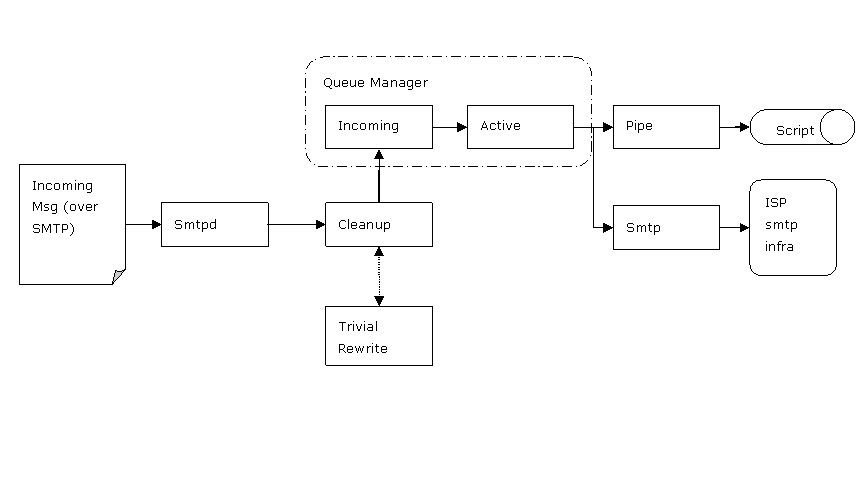
This schema provides an overview on how Postfix will work. Left Incoming (smtp) messages will be picked up by the Smtp-deamon. Then via "Cleanup" it will be handed over to the QueueManager, via the incoming queue. The Queuemanager will put the message on the Active queue. From there it will be picked up by either the smtp-service to forward the mail to the smtp-server on the infrastructure of your Internet Service Provider or your company. Using MA-records of the DNS-server it will determine to which smtp-server it has to be send actually.
In our use-case the pipe deamon is the interesting one. This is the one we're going to instruct to call a script.

Basic Settings
Hostname
The hostname command can be used to determine the fully qualified name. This is the one used by Postfix to determine the host. If this does not include the domain-name then the following command can be used to instruct Postfix what the FQN should be:
postconf -e myhostname=vmsmtp.darwin-it.local


Mydestination
This parameter can be left default. But if mail have to be accepted for certain domains and to be delivered using the local transport, set the following parameter in main.cf:

# 2010-02-03, M. vd. Akker: To have mail accepted for .darwin-it.local
mydestination = $myhostname, localhost.$mydomain, localhost, .darwin-it.local

For now leave it default:
mydestination = $myhostname, localhost.$mydomain, localhost


Network interfaces
To have mail from external networks, non-localhost, the inet_interfaces must be set in main.cf. In my case I run Postfix within a Virtual Machine. And I want to use my Thunderbird to send mail to Postfix. So first Postfix has to be told from which network-devices it should accept mail from. Since my VM is "hidden", for simplicity we accept mail from all network devices. But this can be narrowed down.


# RECEIVING MAIL

# The inet_interfaces parameter specifies the network interface
# addresses that this mail system receives mail on.  By default,
# the software claims all active interfaces on the machine. The
# parameter also controls delivery of mail to user@[ip.address].
#
# See also the proxy_interfaces parameter, for network addresses that
# are forwarded to us via a proxy or network address translator.
#
# Note: you need to stop/start Postfix when this parameter changes.
#
# 2010-02-10, M. van den Akker: Setup all interfaces for excepting mail.
inet_interfaces = all
#inet_interfaces = $myhostname
#inet_interfaces = $myhostname, localhost
#inet_interfaces = localhost


Specific domains to accept mail from are set with mynetworks parameters. To select sub-domains to accept mail from, change the mynetwork parameter to accept mail from your host for example.
# TRUST AND RELAY CONTROL

# The mynetworks parameter specifies the list of "trusted" SMTP
# clients that have more privileges than "strangers".
#
# In particular, "trusted" SMTP clients are allowed to relay mail
# through Postfix.  See the smtpd_recipient_restrictions parameter
# in postconf(5).
#
# You can specify the list of "trusted" network addresses by hand
# or you can let Postfix do it for you (which is the default).
#
# By default (mynetworks_style = subnet), Postfix "trusts" SMTP
# clients in the same IP subnetworks as the local machine.
# On Linux, this does works correctly only with interfaces specified
# with the "ifconfig" command.
#
# Specify "mynetworks_style = class" when Postfix should "trust" SMTP
# clients in the same IP class A/B/C networks as the local machine.
# Don't do this with a dialup site - it would cause Postfix to "trust"
# your entire provider's network.  Instead, specify an explicit
# mynetworks list by hand, as described below.
#
# Specify "mynetworks_style = host" when Postfix should "trust"
# only the local machine.
#
#mynetworks_style = class
#mynetworks_style = subnet
#mynetworks_style = host

# Alternatively, you can specify the mynetworks list by hand, in
# which case Postfix ignores the mynetworks_style setting.
#
# Specify an explicit list of network/netmask patterns, where the
# mask specifies the number of bits in the network part of a host
# address.
#
# You can also specify the absolute pathname of a pattern file instead
# of listing the patterns here. Specify type:table for table-based lookups
# (the value on the table right-hand side is not used).
#
# 2010-02-10, M. van den Akker: Setup for accepting mail from CMI and localhost.
mynetworks = 192.168.192.0/28, 127.0.0.0/8
#mynetworks = 168.100.189.0/28, 127.0.0.0/8
#mynetworks = $config_directory/mynetworks
#mynetworks = hash:/etc/postfix/network_table

Where 192.168.192.0/28 should be replaced by the address-range of the host(s) from which you want to be able to receive email.

Start and stop postfix
Postfix can be stopped by:
[root@vmsmtpserver postfix]# postfix stop
Postfix can be started by:
[root@vmsmtpserver postfix]# postfix start
If it’s not already running.

After making changes to the configuration, Postfix has to be told to reload the configuration:
[root@vmsmtpserver postfix]# postfix reload
postfix/postfix-script: refreshing the Postfix mail system
Incoming e-Mail
Postfix will have to be configured that *.darwin-it.local will be seen as a domain for virtual mailbox addresses. The virtual transport has to be configured that these messages are handled by the pipe-deamon to call an external script.

We'll instruct Postfix also to enrich the smtp-message with two Custom properties:
  • x-envelope-to: Recipient list from the SMTP-Header
  • x-envelope-from: From-email-addres from the SMTP Header
Actually we implement the enrichment in the script. But Postfix will pass these properties as parameters.

Create a transport
To have incoming mail for .darwin-it.local transported to the script, a new transport has to be configured.

This is done in the master.cf file:
# 2010-02-10, M. van den Akker: Setup transport routescript for passing message to a bash-script
routescript   unix  -       n       n       -       -       pipe
flags=FDq. user=smtpuser argv=/bin/bash -c /home/smtpuser/routescript.sh -s $sender -r $recipient -q $nexthop -

Here a new transport is created, named “routescript”. It refers to the “pipe” deamon.

The “flags=FDq” denote that the From and destination addresses from the header are added to the header.
Change the following if necessary:
  • The user denotes the unix-user that is used to run the script. In this case the unix-user “smtpuser” is used. Change it to the proper user (other than “root” or “postfix” ) .
  • argv: denotes in this case that a bash script is called. Bash is called to run the routescript.sh script, that is placed in the home folder of the smtpuser. Change the path according to the correct location of the given script.
  • The next parameters are parameters for the routemq.sh script:
    • -s: the sender of the message, $sender refers to the from-address on the smtp-envelope
    • -r: the recipient(s) of the message, $recipient refers to the to-list on the smtp-envelope
    • -q: the queue on which the message has to be put. Our script was designed to queue the message on IBM mq. The property $nexthop refers to the nexthop property in the transport map. Having used this parameter to denote the particular queue enables us to change only the transport map if a queue is changed. Or reuse this transport for different queues in different transport mappings. This is a nice way to pass info about the actual/technical transport channel to be used.
Create transport map
To route the '.darwin-it.local' domain to the script a transport map has to be made in the transport file.

Add the following line to the transport map file:
# 2010-02-10, M. van den Akker: Setup transport routescript for handling darwin-it.local-messages.
.darwin-it.local routescript:queuename
Where queuename is the queue that is used for the smtp-messages. This is the 'nexthop'-parameter where the $nexthop property in the master.cf refers to.

After having changed the transport map file, it has to be compiled into an indexed binary using the postmap tool. So execute the following command:
[root@vmsmtpserver postfix]# postmap transport
Define transport map
To have the transport map used by Postfix, add the following lines to the main.cf :
# 2010-02-10, M. van den Akker: use transport map
transport_maps=hash:/etc/postfix/transport

Routescript
Make sure that the routescript.sh as given in the appendix is placed on the location as defined in the master.cf above. In the example above it is: /home/smtpuser/routescript.sh
Make it owned by the user that is used by Postfix to execute the script (smtpuser).
Then make the script executable:
[smtpuser@vmsmtpserver postfix]$ chmod +x routescript.sh


The actual script as an example is given at the end of this article.

Outgoing e-Mail
All outgoing e-mail should be forwarded to your companies or ISP's smpt-infrastructure.

To do so set the relay-host parameter to the particular smtp-server in main.cf:
# INTERNET OR INTRANET

# The relayhost parameter specifies the default host to send mail to
# when no entry is matched in the optional transport(5) table. When
# no relayhost is given, mail is routed directly to the destination.
#
# On an intranet, specify the organizational domain name. If your
# internal DNS uses no MX records, specify the name of the intranet
# gateway host instead.
#
# In the case of SMTP, specify a domain, host, host:port, [host]:port,
# [address] or [address]:port; the form [host] turns off MX lookups.
#
# If you're connected via UUCP, see also the default_transport parameter.
#
#relayhost = $mydomain
#relayhost = [gateway.my.domain]
#relayhost = [mailserver.isp.tld]
#relayhost = uucphost
#relayhost = [an.ip.add.ress]
Restart Postfix
After having made the necessary changes above it is important to restart (stop and sart) Postfix. Just doing a reload of the config will probably not suffice.

Conclusion
It took me some time to understand Postfix. I was quite overwhelmed by the options. And it took me some time to figure out how to configure it for this particular usecase. Where I had to consult a co-worker (the one that sort of made up this use-case; thanks to Hugo). But as with most other things: after all it turns out to be simple. And it might be useful for many other cases.

Appendix: the routescript.sh
Below the script is given to be called by Postfix to route the messages. This script is designed to either output the message to a file or to an IBM mq client. The mq-client has to be installed from a licensed installment of IBM. IBM also provides the MA01-support pack, in which for several OS'es an compiled executable is provided. This executable (simply called 'q') provides a commandline interface to the IBM mq-client. The mq-client can put the message to a queue, but also to standard out. This is handy for testing, where no mq-client is available.

There are 2 lines to edit:
• Q=~/bin/ma01/q : give here the proper path the q-executable from the MA01-support pack
• fi|"$Q" -O "$QUEUE_NAME" : here the output of the if-block is outputted to the q-client using the queue-name. If the queue is not available in test-environment this will give an error. For test purposes it might be usefull to comment this line use (uncomment) either the line '#fi|"$Q" -s' to have the q-client output the message to STDOUT, or '#fi>$FILENAME' to have the output directed to file.

The script will exit with the result code of the last command, which is the q-client. If that one fails, the script with exit with the result-code telling Postfix to consider the call failed. Postfix will consider the message undelivered and retry it later.

#!/bin/bash
###################################################################################################
# Route messages.
# Script to route an email message, read from pipe and output it to a channel.
#
# author: Martien van den Akker
# (C) januari 2010
# Darwin-IT Professionals
###################################################################################################
#Declartions
E_WRONG_ARGS=85;
NUMBER_OF_EXPECTED_ARGS=6;
FILENAME=/tmp/routemq-`date +%Y%m%d-%H%M%S.%N`
Q=~/bin/ma01/q
TRUE=1
HDR_ENV_FROM="x-envelope-from"
HDR_ENV_TO="x-envelope-to"

#Function to display usage
usage(){
SCRIPT_PARAMETERS="-r receiver -s sender -q queuename";
USAGE="Usage: `basename $0` $SCRIPT_PARAMETERS";
echo $USAGE;
}

# Check Arguments
if [ $# -lt $NUMBER_OF_EXPECTED_ARGS ]
then
usage
exit $E_WRONG_ARGS;
fi
until [ -z "$1" ]
do
case $1 in
"-s") SENDER=$2;;
"-r") RECEIVER=$2;;
"-q") QUEUE_NAME=$2;;
* ) usage;
exit $E_WRONG_ARGS;;
esac;
shift 2;
done;

#echo header variables and cat stdin to output.
#Edit next line to give the proper full path to the “q”-executable from the MA01-support-pack
if [ "$TRUE" ]
then
echo "$HDR_ENV_FROM: $SENDER"
echo "$HDR_ENV_TO: $RECEIVER"
cat -
fi|"$Q"  -O "$QUEUE_NAME" #  uncomment to output to $QUEUENAME (Comment previous line)
#fi|"$Q" -s # only output to stdout
#fi>$FILENAME #uncomment to output to filename

exit $? #Exit with result-code of last command, which is the "q" command.