Showing posts with label BPEL PM. Show all posts

Friday, 19 June 2020

Use of correlation sets in SOA Suite

Years ago, I had plans to write a book about BPEL or at least a series of articles to be bundled as a BPEL Course. I stranded with only one Hello World article.

This year, I came up with the idea of doing something around Correlation Sets. Preparing a series of articles and a talk. And therefor, let's start with an article on Correlation Sets in BPEL. Maybe later on I could pick up those earlier plans again.

You may have read "BPEL", and tend to skip this article. But wait, if you use BPM Suite: the Oracle BPM Process Engine is the exact same thing as the BPEL Process engine! And if you use the Processes module of Oracle Integration Cloud: it can use Correlation Sets too. Surprise: again it uses the exact same Process Engine as Oracle SOA Suite BPEL and Oracle BPM Suite.

Why Correlation Sets?

Now, why Correlation Sets and what are those? You may be familiar with OSB or maybe Mulesoft, or other integration tools.
OSB is a stateless engine. What comes in is executed at once until it is done. So, services in OSB are inherently synchronous and short-lived. You may argue that you can do Asynch Services in OSB. But those are in fact "synchronous" one-way services. Fire & Forget, as you will. They are executed right away (hence the quoted synchronous) , until it is done. But the calling application does not expect a result (and thus asynchronous in the sense that the caller won't wait).

You could, and I have done it actually, create asynchronous request response services in OSB. Asynchronous Request Response services are actually two complementary one way fire & forget services. For such a WSDL both services are defined in different port types: one for the actual service consumer, and one callback service for the service provider. Using WS-Addressing header elements the calling service will provide a ReplyTo callback-endpoint and a MessageId to be provided by the responding service as an RelatesTo MessageId.

This RelatesTo MessageId serves as a correlation id, that maps to the initiating MessageId. WS- Addressing is a Webservice standard that describes the SOAP Header elements to use. As said, you can do this in OSB, OSB even has the WS-Addressing namespaces already defined. However, you have to code the determination and the setting of the MessageId and ReplyTo-Address yourself.

Because of the inherently stateless foundation of OSB the services are short-lived and thats why OSB is not suitable for long running processes. The Oracle SOASuite BPEL engine on the other hand, is designed to orchestrate Services (WebServices originally, but from 12c onwards REST Services as well) in a statefull way. This makes BPEL suitable for long running transactions as well. Because of that after the acquisition of Collaxa, the company who created the BPEL Engine, Oracle decided to replace it's own database product Oracle Workflow (OWF) with BPEL.  And SOA Suite and it's BPEL engine natively support WS-Addressing. Based upon an Async Request/Response WSDL it will make sure it adds the proper WS-Addressing elements and has a SOAP Endpoint to catch response messages. Based upon the RelatesTo message id  in the response it will correlate the incoming response with the proper BPEL process instance that waits for that message.

A BPEL process may run from a few seconds, to several minutes, days, months, or potentially even years. Although experience learned us that we wouldn't recommend BPEL services to run for longer than a few days. For real long running process you should choose BPM Suite or Oracle Integration Cloud/Process.

WS-Addressing helps in correlating response messages to requests that are sent out previously. But, it does not correlate Ad-Hoc messages. When a process runs for more than a few minuts, chances are that the information stored within the process is changed externally. A customer waiting for a some process may have relocated or even died. So you may need to interact with a running process. You want to be able to send a message with the changed info to the running process instance. And you want to be sure that the engine correlates the message to the correct instance. Correlation Sets help with these ad-hoc messages that may or may not be send at any time during the running of the process.

An example BPEL process

Let's make a simple customer processing process that reads an xml file and processes it and writes it back to an xml file.
My composite looks like:
It has two File Adapter definitions, an exposed service that polls on the /tmp/In folder for customer*.xml files. And a reference service that writes an xml file into the /tmp/Out folder as customer%SEQ%_%yyMMddHHmmss%.xml. I'm not going to explain how to setup the File adapters, that would be another course-chapter.

For both adapters I created the following XSD:
<?xml version="1.0" encoding="UTF-8" ?>
<xsd:schema xmlns:xsd="http://www.w3.org/2001/XMLSchema" xmlns:cmr="http://xmlns.darwin-it.nl/xsd/demo/Customer"
            targetNamespace="http://xmlns.darwin-it.nl/xsd/demo/Customer" elementFormDefault="qualified">
  <xsd:element name="customer" type="cmr:CustomerType">
    <xsd:annotation>
      <xsd:documentation>A customer</xsd:documentation>
    </xsd:annotation>
  </xsd:element>
  <xsd:complexType name="CustomerType">
    <xsd:sequence>
      <xsd:element name="id" maxOccurs="1" type="xsd:string"/>
      <xsd:element name="firstName" maxOccurs="1" type="xsd:string"/>
      <xsd:element name="lastName" maxOccurs="1" type="xsd:string"/>
      <xsd:element name="lastNamePrefixes" maxOccurs="1" type="xsd:string" minOccurs="0"/>
      <xsd:element name="gender" maxOccurs="1" type="xsd:string"/>
      <xsd:element name="streetName" maxOccurs="1" type="xsd:string"/>
      <xsd:element name="houseNumber" maxOccurs="1" type="xsd:string"/>
      <xsd:element name="country" maxOccurs="1" type="xsd:string"/>
    </xsd:sequence>
  </xsd:complexType>
</xsd:schema>
(Just finishing this article, I encounter that I missed a city element. It does not matter for the story, but in the rest of the example I use the country field for city.)

The first iteration of the BPEL process just receives the file from the customerIn adapter, assigns it to the the input variable of the invoke of the customerOut adapter and invokes it:

Deploy it to the SOA Server and test it:

[oracle@darlin-ind In]$ ls ../TestFiles/
customer1.xml  customer2.xml
[oracle@darlin-ind In]$ cp ../TestFiles/customer1.xml .
[oracle@darlin-ind In]$ ls
customer1.xml
[oracle@darlin-ind In]$ ls
customer1.xml
[oracle@darlin-ind In]$ ls
customer1.xml
[oracle@darlin-ind In]$ ls
[oracle@darlin-ind In]$ ls ../Out/
customer2_200617125051.xml
[oracle@darlin-ind In]$
The output customer hasn't changed and is just like the input:
[oracle@darlin-ind In]$ cat ../Out/customer2_200617125051.xml
<?xml version="1.0" encoding="UTF-8" ?><customer xmlns:xsi="http://www.w3.org/2001/XMLSchema-instance" xsi:schemaLocation="http://xmlns.darwin-it.nl/xsd/demo/Customer ../Schemas/Customer.xsd" xmlns="http://xmlns.darwin-it.nl/xsd/demo/Customer">
  <id>1001</id>
  <firstName>Jean-Michel</firstName>
  <lastName>Jarre</lastName>
  <gender>M</gender>
  <streetName>Rue d'Oxygene</streetName>
  <houseNumber>4</houseNumber>
  <country>Paris</country>
</customer>
[oracle@darlin-ind In]$

This process is now rather short-lived and doesn't do much except for moving the contents of the file. Now, let's say that this processing of the file takes quite some time and but during the processing the customer can have relocated, or died or has otherwise changed it's information.

I expanded my composite with a SOAP Service, based on a One-Way WSDL, that is based upon the same xsd:
And this is how I changed the BPEL:


In this example, after setting the customer to the customerOut variable, there is a long running  "customer processing" sequence, that takes "about" 5 minutes.

But in parallel it now also listens to the UpdateCustomer partnerlink using a Receive. This could be done in a loop to also receive more follow-up messages.

This might look like a bit unnecessarily complex, with the throw and catch combination. But the thing with the Flow activity is that it completes only when all the branches are completed. So, you need a means to "kill" the Receive_UpdateCustomer activity. Adding  a Throw activity does this nicely. Although the activity is colored red, this is not an actual Fault exception. I use it here as a flow-control activity. It just has a simple fault name, that I found the easiest to enter in the source:
<throw name="ThrowFinished" faultName="client:Finished"/>

This is because you can just use the client namespace reference. While in the designer you should provide a complete namespace URI:

Same counts for the Catch, after creating one, it's easier to add the namespace from the source:
        <catch faultName="client:Finished">
          <assign name="AssignInputCustomer">
            <copy>
              <from>$ReceiveCustomer_Read_InputVariable.body</from>
              <to expressionLanguage="urn:oasis:names:tc:wsbpel:2.0:sublang:xpath1.0">$Invoke_WriteCustomerOut_Write_InputVariable.body</to>
            </copy>
          </assign>
        </catch>

Side-note: did you know that if you click on an activity or scope/sequence in the Designer and switch to the source, the cursor will be moved to the definition of the activity you selected? To me this often comes handy with larger BPELs.

By throwing the Finished exception the flow activity is left and by that all the unfinished branches are also closed and by that the Receive is quit too.

When you get a SOAP message in the bpel example above you would still wait for finishing the process branch. You probably also need to notify the customer processing branch that the data is changed. That can be done in the same way, by doing a throw of a custom exception.

How to define Correlation Sets

The example above won't work as is. Because, how does BPEL know to which process instance the message has to be sent? We need to create a Correlation set. And to do so we need to define how we can correlate the UpdateCustomer message to the customerIn message. Luckily there is a Customer.id field. For this example that will do. But keep in mind: you can have multiple processes running for a customer. So you should add something that will identify the instance.

You can add and edit correlation sets on the invoke, receive, and pick/onMessage activities. But also from the BPEL menu:


Then you can define a Correlation Set:


As you can see you can create multiple Correlation Sets, each with one or more properties. In the last window, create a property, then select it for the Correlation Set and click ok. Up to the first dialog.


You'll see that the Correlation Set isn't valid yet. What misses, what I didn't provide in the last dialog, are the property aliases. We need to map the properties to the messages.
I find it convenient to do that on the activities, since we also need to couple the correlation Sets to particular Invoke, Receive, and/or Pick/OnMessage activities. Let's begin with the first receive:


Select the Correlations tab, and add the Correlation Set. Since this is the activity that the Customer Id first appears in a message in the BPEL processe, we need to initiate the Correlation Set. This can also be done on an invoke, when calling a process that may cause multiple ad-hoc follow-up messages. So, set the Initiate property to yes.
Also, here you can have multiple correlation sets on an activity.

Then click the edit (pencil) button to edit the Correlation Set. And add a property alias:

To find the proper message type, I find it convenient to go through the partnerlink node, then select the proper WSDL. From that WSDL choose the proper message type. Now, you would think you could select the particular element. Unfortunately, it is slightly less user-friendly. After choosing the proper message type in the particular WSDL, click in the query field and type CTRL-Space. A balloon will pop up with the possible fields and when the field has a child element, then a follow-up balloon will pop-up. Doing so, finish your xpath, and click as many times on Ok to get all the dialogs closed properly.

Another side-node, the CTRL-Space way of working with balloons also works with the regular expression builder in with creating Assign-Copy-rules. Sometimes I get the balloons un-asked for, which I actually find annoying sometimes.

Do the same for the customer update Receive:
Here it is important to select No for the initate: we now adhere to the initiated Correlation Set.

Wrap this up, deploy the composite and test.

Test Correlations

As in the first version copy an xml file to the /tmp/In folder. This results in a following BPEL Flow:

The yellow-highlighted activities are now active. So, apparently it waits for a Receive and for the processing (Wait activity).

From the flow trace you can click on the compositename, besides the instance id, and then click on the Test button:
And enter new values for your customer:


In the bottom right corner you can click on the "Test Web Service" button, and from the resulting Response tab you can click on the launch flow trace.

You'll find that the Receive has been done, and the Assign after that as well. Now, only the Wait activity is active.


After processing the flow it throws a Finished exception, and finishes the BPEL Flow.
In this case the Receive was earlier than finisihing the Wait activity. So, in this flow the throw is unnecessary, but when the message wasn't received, then the throw is needed.

Looking in the /tmp/Out folder we see that the file is updates neatly from the Update:
[oracle@darlin-ind In]$ ls ../Out/
customer2_200617125051.xml  customer3_200619160921.xml
[oracle@darlin-ind In]$ cat ../Out/customer3_200619160921.xml
<?xml version="1.0" encoding="UTF-8" ?><ns1:customer xmlns:ns1="http://xmlns.darwin-it.nl/xsd/demo/Customer">
            <ns1:id>1001</ns1:id>
            <ns1:firstName>Jean-Michel</ns1:firstName>
            <ns1:lastName>Jarre</ns1:lastName>
            <ns1:lastNamePrefixes/>
            <ns1:gender>M</ns1:gender>
            <ns1:streetName>Equinoxelane</ns1:streetName>
            <ns1:houseNumber>7</ns1:houseNumber>
            <ns1:country>Paris</ns1:country>
        </ns1:customer>[oracle@darlin-ind In]$

A bit of techie-candy

Where is all this beautifull stuff registered?
First of all, for the Correlation properties, you will find a new WSDL has appeared:

At the top of the source of the BPEL you'll find the following snippet:
 <bpelx:annotation>
    <bpelx:analysis>
      <bpelx:property name="propertiesFile">
        <![CDATA[../WSDLs/ProcessCustomer_properties.wsdl]]>
      </bpelx:property>
    </bpelx:analysis>
  </bpelx:annotation>
  <import namespace="http://xmlns.oracle.com/pcbpel/adapter/file/CorrelationDemo/CorrelationDemo/customerIn"
          location="../WSDLs/customerIn.wsdl" importType="http://schemas.xmlsoap.org/wsdl/" ui:processWSDL="true"/>

Here you see a reference to the properties wsdl. Also an import of the customerIn.wsdl. Let's take a look in there:
<?xml version= '1.0' encoding= 'UTF-8' ?>
<wsdl:definitions
     name="customerIn"
     targetNamespace="http://xmlns.oracle.com/pcbpel/adapter/file/CorrelationDemo/CorrelationDemo/customerIn"
     xmlns:tns="http://xmlns.oracle.com/pcbpel/adapter/file/CorrelationDemo/CorrelationDemo/customerIn"
     xmlns:jca="http://xmlns.oracle.com/pcbpel/wsdl/jca/"
     xmlns:plt="http://schemas.xmlsoap.org/ws/2003/05/partner-link/"
     xmlns:pc="http://xmlns.oracle.com/pcbpel/"
     xmlns:imp1="http://xmlns.darwin-it.nl/xsd/demo/Customer"
     xmlns:wsdl="http://schemas.xmlsoap.org/wsdl/"
     xmlns:cor="http://xmlns.oracle.com/CorrelationDemo/CorrelationDemo/ProcessCustomer/correlationset"
     xmlns:bpel="http://docs.oasis-open.org/wsbpel/2.0/process/executable"
     xmlns:vprop="http://docs.oasis-open.org/wsbpel/2.0/varprop"
     xmlns:ns="http://oracle.com/sca/soapservice/CorrelationDemo/CorrelationDemo/Customer"
    >
    <plt:partnerLinkType name="Read_plt">
        <plt:role name="Read_role">
            <plt:portType name="tns:Read_ptt"/>
        </plt:role>
    </plt:partnerLinkType>
    <vprop:propertyAlias propertyName="cor:customerId" xmlns:tns="http://xmlns.oracle.com/pcbpel/adapter/file/CorrelationDemo/CorrelationDemo/customerIn"
         messageType="tns:Read_msg" part="body">
        <vprop:query>imp1:id</vprop:query>
    </vprop:propertyAlias>
    <vprop:propertyAlias propertyName="cor:customerId" xmlns:ns13="http://oracle.com/sca/soapservice/CorrelationDemo/CorrelationDemo/Customer"
         messageType="ns13:requestMessage" part="part1">
        <vprop:query>imp1:id</vprop:query>
    </vprop:propertyAlias>
    <wsdl:import namespace="http://oracle.com/sca/soapservice/CorrelationDemo/CorrelationDemo/Customer"
         location="Customer.wsdl"/>
    <wsdl:import namespace="http://xmlns.oracle.com/CorrelationDemo/CorrelationDemo/ProcessCustomer/correlationset"
         location="ProcessCustomer_properties.wsdl"/>

Below the partnerLinkType you find the propertyAliases.
Especially with older, migrated processes, this might be a bit tricky, because you might get the property aliases not in the wsdl you want. Then you need to register the proper wsdl in the BPEL and move the property aliases to the other wsdl, together with the vprop namespace declaration.
When you move the WSDL to the MDS for reuse, move the property aliases to another wrapper WSDL. You shouldn't move the property aliases to the MDS with it. Because they belong to the process and shouldn't be shared, but also it makes it impossible for the designer to change. I'm not sure if it even would work. Probably it does, but you should not have that.

As I mentioned before, you can have multiple Correlation Sets in your BPEL (or BPMN) process and even on an activity. In complex interactions this may make perfectly sense. For instance when there is overlap. You  may have initiated one Correlation Set on an earlier Invoke or Receive, and use that to correlate to another message in a Receive. But that message may have another identifying field that can be used to correlate with other interactions. And so you may have a non-initiating Correlation Set on an activity that initiates another one. Maybe even based on different property-aliases on the same message.

Pitfalls

Per CorrelationSet you can have multiple properties. They are concatenated on to a string. Don't use too many properties to make-up the correlation set. Perferably only one. And use short scalar elements for the properties. In the past the maximum length was around 1000 characters. I've no idea what it is now. But multiple properties and property aliases may make it error-prone. During the concatenation, a different formatting may occur. It is harder to check, validate if the correlation elements in the messages conform with eachother.

In the example above I used the customer id for the correlation property. This results in an initiated correlation set where the UpdateCustomer Receive is listening for. If you would initiate another process instance for the same customer, the process engine will find at the UpdateCustomer Receive that there already is a (same) Receive with the same Correlation Set. And will fail. The process engine identifies the particular activity in the process definition and the combination process-activity and Correlation Set is unique. A uniqueness violation at this point will result in a runtime fault.

It doesn't matter if the message is initiate before of after the Receive is activated. If you would be so fast to issue an UpdateCustomer request before the process instance has activated the Receive, then it will be stored in a table, and picked up when the Receive activity is reached.

Conclusion

This may be new to you and sound very sophisticated. Or, not of course, if you were already familiar with it. If this is new to you: it was already in the product when Oracle acquired it in 2004!
And not only that, you can use it in OIC Processes as well. Also for years. I wrote about that in 2016.

More on correlation sets, check out the docs.

Wednesday, 11 March 2020

SOA Composite Sensors and the ORA-01461: can bind a LONG value only for insert into a LONG column exception

Last year I wrote about SOA Composite Sensors and how they can be a good alternative for the BPEL Indexes in 10g. This week I was confronted with the "ORA-01461: can bind a LONG value only for insert into a LONG column" exception in one of our composites. It was about a process that is triggered to do some message archiving.

A bit about BPEL Sensors

Funny thing is that this archiving process is triggered by BPEL sensor. To recap: you can create a BPEL Sensor by clicking the monitor icon in your BPEL process:
It's the heart-beat-monitor icon in the button-area top right of the panel. Then it shows the BPEL process in a Layered mode, you can't edit the process any more, but you can add, remove and edit sensors. Sensors are indicated with little antenna icons with an activity. You can put them on any kind of activity. Even Empty activities, what adds extra potential reason to use to an empty activity.

If you click an antena icon you can define a series of sensors, but editing them will bring up the following dialog:

It allows you to add variables and possible expressions to elements within those variables to a sensor. And also add one of more sensor actions that can be triggered on the trigger moment (Evaluation Time) that can be set as well.

A Sensor action can be set as:


In 11g we used the JMS Adapter, but apparently that didn't work anymore the way it was in 12c. So, we changed it to JMS Queues. As with compsite sensors, in the BPEL folder, together with the BPEL process you get two files: YourBPELProcess_sensor.xml containing the Sensor definitions and YourBPELProcess_sensorAction.xml containing the sensor action definitions.

When the sensor is activated, a JMS message is produced on the queue, with an xml following a  predefined xsd. In that XML you will find info about the triggering BPEL instance, like name and instance ID, and a list of variable data. Each of the variables defined in the Sensor is in the list, in the order as defined in the sensor.

By the way, BPEL sensors are part of the product since before 10g...

The actual error case

In our case this message archiving process was triggered from another bpel using a Sensor. The archiving process was listening to the queue as defined in the Sensor Action. Picking up messages that are from certain sensors, using a message selector  based on the sensor name.

On the JMS Interface (Exposed Service) of the message archiving process, I defined a set of Composite Sensors, to be able to search for them. This would help in finding the  archiving instance that belongs to the triggering process. Since sensors work asynchronously, they're not tight together in a Flow Trace.

In some cases, we got the following exception in the Diagnostic log:
[2020-03-11T09:19:50.855+01:00] [DWN_SOA_01] [WARNING] [] [oracle.soa.adapter.jms.inbound] [tid: DaemonWorkThread: '639' of WorkManager: 'default_Adapters'] [userId: myadmin] [ecid: c8e2b75e-7aed-4305-84c5-9ef5cf928c7b-0bb833b1,0:11:9] [APP: soa-infra] [partition-name: DOMAIN] [tenant-name: GLOBAL] [oracle.soa.tracking.FlowId: 463993] [oracle.soa.tracking.InstanceId: 762213] [oracle.soa.tracking.SCAEntityId: 381353] [oracle.soa.tracking.FaultId: 400440] [FlowId: 0000N38eGGo5aaC5rFK6yY1UNay100012j]  [composite_name: MyComposite] [composite_version: 1.0] [endpoint_name: DWN_MyCompositeInterface_WS] JmsConsumer_runInbound: [destination = jms/DWN_OUTGOING, subscriber = null] : weblogic.transaction.RollbackException: Unexpected exception in beforeCompletion: sync=org.eclipse.persistence.transaction.JTASynchronizationListener@2d7a86a9[[

Internal Exception: java.sql.BatchUpdateException: ORA-01461: can bind a LONG value only for insert into a LONG column

Error Code: 1461 javax.resource.ResourceException: weblogic.transaction.RollbackException: Unexpected exception in beforeCompletion: sync=org.eclipse.persistence.transaction.JTASynchronizationListener@2d7a86a9

Internal Exception: java.sql.BatchUpdateException: ORA-01461: can bind a LONG value only for insert into a LONG column

Error Code: 1461
        at oracle.tip.adapter.jms.inbound.JmsConsumer.afterDelivery(JmsConsumer.java:321)
        at oracle.tip.adapter.jms.inbound.JmsConsumer.runInbound(JmsConsumer.java:982)
        at oracle.tip.adapter.jms.inbound.JmsConsumer.run(JmsConsumer.java:893)
        at oracle.integration.platform.blocks.executor.WorkManagerExecutor$1.run(WorkManagerExecutor.java:184)
        at weblogic.work.j2ee.J2EEWorkManager$WorkWithListener.run(J2EEWorkManager.java:209)
        at weblogic.invocation.ComponentInvocationContextManager._runAs(ComponentInvocationContextManager.java:352)
        at weblogic.invocation.ComponentInvocationContextManager.runAs(ComponentInvocationContextManager.java:337)
        at weblogic.work.LivePartitionUtility.doRunWorkUnderContext(LivePartitionUtility.java:57)
        at weblogic.work.PartitionUtility.runWorkUnderContext(PartitionUtility.java:41)
        at weblogic.work.SelfTuningWorkManagerImpl.runWorkUnderContext(SelfTuningWorkManagerImpl.java:644)
        at weblogic.work.SelfTuningWorkManagerImpl.runWorkUnderContext(SelfTuningWorkManagerImpl.java:622)
        at weblogic.work.DaemonWorkThread.run(DaemonWorkThread.java:39)
Caused by: javax.resource.ResourceException: weblogic.transaction.RollbackException: Unexpected exception in beforeCompletion: sync=org.eclipse.persistence.transaction.JTASynchronizationListener@2d7a86a9

Internal Exception: java.sql.BatchUpdateException: ORA-01461: can bind a LONG value only for insert into a LONG column

Error Code: 1461
        at oracle.tip.adapter.fw.jca.messageinflow.MessageEndpointImpl.afterDelivery(MessageEndpointImpl.java:379)
        at oracle.tip.adapter.jms.inbound.JmsConsumer.afterDelivery(JmsConsumer.java:306)
        ... 11 more
Caused by: weblogic.transaction.RollbackException: Unexpected exception in beforeCompletion: sync=org.eclipse.persistence.transaction.JTASynchronizationListener@2d7a86a9

Internal Exception: java.sql.BatchUpdateException: ORA-01461: can bind a LONG value only for insert into a LONG column
...

Of course the process instance failed. It took me some time to figure out what went wrong. It was suggested that it was due to the composite sensors, but I waved that away initially, since I introduced them earlier (although a colleague had removed them for no apparent reason and I re-introduced them). I couln't see that these were the problem, because it ran through the unit-tests and in most cases they weren't a problem.

But the error indicates an triggered interface: [endpoint_name: DWN_MyCompositeInterface_WS], and in this case a destination: [destination = jms/DWN_OUTGOING, subscriber = null].

Since the process is triggered from the queue with messages from BPEL Sensors these Composite Sensors were defined on variableData from the BPEL Sensor XML. And as said above, the variables appear in the XML in the order they're defined in the BPEL Sensor.

One of the Composite Sensors were defined as:
<sensor sensorName="UitgaandBerichtNummer" kind="service" target="undefined" filter="" xmlns:imp1="http://xmlns.oracle.com/bpel/sensor">
    <serviceConfig service="DWN_MessageArchivingBeginExchange_WS" expression="$in.actionData/imp1:actionData/imp1:payload/imp1:variableData/imp1:data" operation="ArchiverenBeginUitwisseling" outputDataType="string" outputNamespace="http://www.w3.org/2001/XMLSchema"/>
</sensor>

With the expression: $in.actionData/imp1:actionData/imp1:payload/imp1:variableData/imp1:data.
Because it is a list, there can be more than one variableData occurences. And without an index, it will select all of them. If, for instance one them contains the actual message to archive, and that message is quite large, then the resulting value becomes too large. And that results in the error above.

All I had to do is to select the proper occurence of the message id as shown in the Sensor Dialog above. The expression had to be: $in.actionData/imp1:actionData/imp1:payload/imp1:variableData[2]/imp1:data

Conclusion

This solved the error. I wanted to log this for future reference. But, also to show how to find out this seemingly more obscure error.

Tuesday, 25 September 2018

Split your flow trace in BPEL

A quick one today. In the past we suffered from very large flowtraces in SOA Suite 11g, due to which it could happen that a flow trace wasn't parsable in EM. And therefor could not be shown.

Also, you might have other reasons to split up your flow trace. Maybe because you want to have a callee BPEL process that may run for a longer time run on, while the calling BPEL project is redeployed (although I haven't tested that yet, so I'm not sure if that would work).

I did know it should be possible to split up the flow traces by changing the ECID (Execution Context ID). But, haven't seen it and wasn't able to find it. But, today I found the how-to in Oracle Support Note 2278472.1. So, as  a note-to-myself, here it is.

In the invoke activity to a child process you should add the following property:
<bpelx:toProperty name="tracking.ecid" variable="ora:generateGUID()"/>

This will update the tracking.ecid to a GUID.You should/need to do this on the invoke only (not on the receive). It should not cause any collission or conflict, since it generates a Global Unique Identifier.

Tuesday, 18 September 2018

SOA 12c MDS configuration

In a previous post I described how to have the integrated Weblogic of your SOA/BPM QuickStart refer to the same filebased MDS that you might refer to in the SOADesignTimeRepository in JDeveloper.

These days for my current customer I'm looking into upgrading 11g, as can be read from my previous posts. This customer also has a legacy with projects migrated from 10g.

In the 11g workspace there was a reference to the database MDS in the Development database. In 12c we have a designtime mds reference. I would recommend to refer that to the mds artefacts in your VCS (Version Control System: svn or git) working copy. To do so, call-up the Resources pane in JDeveloper and right click on the SOADesignTimeRepository:
Then navigate to the location in your working copy:
Mind that SOASuite expects an apps folder within this folder, so resulting references in the composite.xml, etc. are expected to start with oramds:/apps/....

Now, I migrated a few projects including a adf-config.xml. In stead of the DB MDS repo, I replaced it with a file-based reference in the adf-config.xml, refering to the SOADesignTimeRepository. If you create a new 12c SOA Application, the adf-config.xml will look like:
<?xml version="1.0" encoding="windows-1252" ?>
<adf-config xmlns="http://xmlns.oracle.com/adf/config" xmlns:adf="http://xmlns.oracle.com/adf/config/properties"
            xmlns:sec="http://xmlns.oracle.com/adf/security/config">
  <adf:adf-properties-child xmlns="http://xmlns.oracle.com/adf/config/properties">
    <adf-property name="adfAppUID" value="MyApplication-1234"/>
  </adf:adf-properties-child>
  <sec:adf-security-child xmlns="http://xmlns.oracle.com/adf/security/config">
    <CredentialStoreContext credentialStoreClass="oracle.adf.share.security.providers.jps.CSFCredentialStore"
                            credentialStoreLocation="../../src/META-INF/jps-config.xml"/>
  </sec:adf-security-child>
  <adf-mds-config xmlns="http://xmlns.oracle.com/adf/mds/config">
    <mds-config xmlns="http://xmlns.oracle.com/mds/config">
      <persistence-config>
        <metadata-namespaces>
          <namespace path="/soa/shared" metadata-store-usage="mstore-usage_1"/>
          <namespace path="/apps" metadata-store-usage="mstore-usage_2"/>
        </metadata-namespaces>
        <metadata-store-usages>
          <metadata-store-usage id="mstore-usage_1">
            <metadata-store class-name="oracle.mds.persistence.stores.file.FileMetadataStore">
              <property name="partition-name" value="seed"/>
              <property name="metadata-path" value="${soa.oracle.home}/integration"/>
            </metadata-store>
          </metadata-store-usage>
          <metadata-store-usage id="mstore-usage_2">
            <metadata-store class-name="oracle.mds.persistence.stores.file.FileMetadataStore">
              <property name="metadata-path" value="${soamds.apps.home}"/>
            </metadata-store>
          </metadata-store-usage>
        </metadata-store-usages>
      </persistence-config>
    </mds-config>
  </adf-mds-config>
</adf-config>

In the metadata-store-usage with id mstore-usage_2 you'll find the reference ${soamds.apps.home} in the metadata-path property. This refers to the folder as choosen in your SOADesignTimeRepository.

Now, I found in the past several times that although the adf-config.xml was similar to the above, that the MDS references did not work. In those cases, as a workaround, I put the absolute path reference in the metadata-path property.

Today I found something similar because of the upgrade, and searched on MDS-01333: missing element "mds-config" This resulted in this article, that gave me the hint.

It turns out that the snippet:
  <adf:adf-properties-child xmlns="http://xmlns.oracle.com/adf/config/properties">
    <adf-property name="adfAppUID" value="MyApplication-1234"/>
  </adf:adf-properties-child>

get's in the way. the UID refers to the application name and some generated number. It turns out not enough to change it the name of the application with a generated number. I haven't found what the proper number should be. So I just removed that snippet and then it worked.

Thursday, 12 July 2018

SOASuite12c - BPEL: JTA transaction is not in active state

Yesterday I ran into this pretty weird problem.

A bit of context...

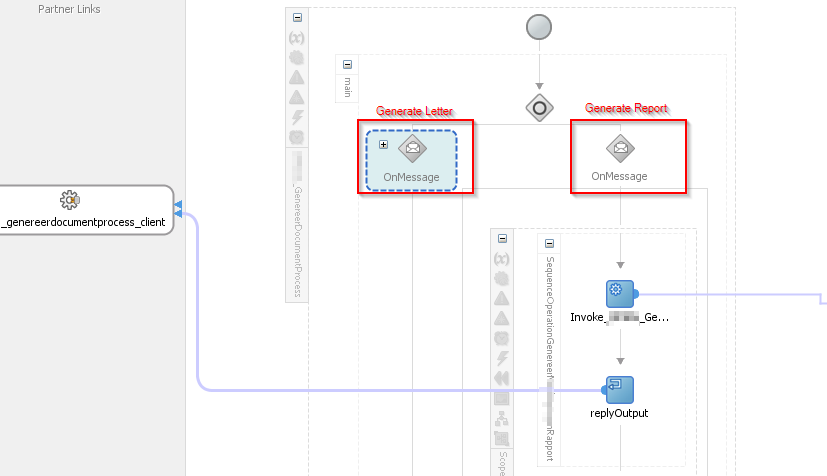
I have two BPEL services to generate documents using BIP. One I created earlier that is based on a generic XML used by BIP to generate multiple letters. Now I had to create another one that is a report, so uses another XML. I generated an XSD for both XML's but since they haven't got a namespace, but same element names, I can't have them in the same composite. So, I duplicated the code.

I created a WSDL with two operations, one for the letters and one for the report, so I wanted to call the report from the service that created the letters. The first service is called 'GenerateDocument', but with an operation 'GenerateLetter', but with an added operation 'GenerateReport'.

So I changed the BPEL and replaced the 'Receive' by a Pick:
In the invoke it calls the 'GenerateReport' BPEL service, that does basically exact the same as in the scope under the 'Generate Letter' OnMessage.

In the 'GenerateReport' BPEL service (and from the 'Generate Letter' scope) I call a Base64Encoding service. It gets an XML in, and it will encode it to string using ora:getContentAsString() and encode that using a Spring bean, based on a quite simple java bean:


But now the problem...


So, called seperately, the 'Generate Report' service functioned just fine. Also the 'Generate Letter' operation of the 'Generate Document' service, thus the 'Generate Lettter' OnMessage from the Pick above, function just fine. But, when I call the 'Generate Document' service using the 'Generate Report' operation, resulting in the other OnMessage I'll get the following message on return from the Base64Encoding service:
<exception class="com.collaxa.cube.engine.EngineException">JTA transaction is not in active state.
The transaction became inactive when executing activity "" for instance "60,004", bpel engine can not proceed further without an active transaction. please debug the invoked subsystem on why the transaction is not in active status. the transaction status is "MARKED_ROLLBACK".
The reason was The execution of this instance "60004" for process "MyFancyProcess" is supposed to be in an active jta transaction, the current transaction status is "MARKED_ROLLBACK", the underlying exception is "EJB Exception: " .
Consult the system administrator regarding this error.
<stack>
            <f>com.oracle.bpel.client.util.TransactionUtils.throwExceptionIfTxnNotActive#126</f>
            <f>com.collaxa.cube.ws.WSInvocationManager.invoke#398</f>
            <f>com.collaxa.cube.engine.ext.common.InvokeHandler.__invoke#1460</f>
            <f>com.collaxa.cube.engine.ext.common.InvokeHandler.handleNormalWSDLInvoke#806</f>
            <f>com.collaxa.cube.engine.ext.common.InvokeHandler.handleNormalInvoke#497</f>
            <f>com.collaxa.cube.engine.ext.common.InvokeHandler.handle#158</f>
            <f>com.collaxa.cube.engine.ext.bpel.common.wmp.BPELInvokeWMP.__executeStatements#78</f>
            <f>com.collaxa.cube.engine.ext.bpel.common.wmp.BaseBPELActivityWMP$1.call#197</f>
            <f>com.collaxa.cube.engine.ext.bpel.common.wmp.BaseBPELActivityWMP$1.call#195</f>
            <f>com.collaxa.bpel.sws.SWSComponentProcessActivityWrapper$1.call#74</f>
            <f>com.collaxa.bpel.sws.SWSCallableActivityWrapper.execute#89</f>
            <f>com.collaxa.bpel.sws.SWSComponentProcessActivityWrapper.execute#82</f>
            <f>com.collaxa.cube.engine.ext.bpel.common.wmp.BaseBPELActivityWMP.perform#205</f>
            <f>com.collaxa.cube.engine.CubeEngine.performActivity#2922</f>
            <f>com.collaxa.cube.engine.CubeEngine._handleWorkItem#1289</f>
            <f>com.collaxa.cube.engine.CubeEngine.handleWorkItem#1178</f>
            <f>...</f>
         </stack>
      </exception>
<root class="oracle.fabric.common.FabricInvocationException">EJB Exception: <stack>
            <f>oracle.fabric.CubeServiceEngine.handleRequestResponseServerException#3920</f>
            <f>oracle.fabric.CubeServiceEngine.request#653</f>
            <f>oracle.integration.platform.blocks.mesh.SynchronousMessageHandler.doRequest#151</f>
            <f>oracle.integration.platform.blocks.mesh.MessageRouter.request#217</f>
            <f>oracle.integration.platform.blocks.mesh.MeshImpl.request#283</f>
            <f>sun.reflect.NativeMethodAccessorImpl.invoke0</f>
            <f>sun.reflect.NativeMethodAccessorImpl.invoke#62</f>
            <f>sun.reflect.DelegatingMethodAccessorImpl.invoke#43</f>
            <f>java.lang.reflect.Method.invoke#498</f>
            <f>org.springframework.aop.support.AopUtils.invokeJoinpointUsingReflection#318</f>
            <f>org.springframework.aop.framework.ReflectiveMethodInvocation.invokeJoinpoint#183</f>
            <f>org.springframework.aop.framework.ReflectiveMethodInvocation.proceed#150</f>
            <f>oracle.integration.platform.metrics.PhaseEventAspect.invoke#57</f>
            <f>org.springframework.aop.framework.ReflectiveMethodInvocation.proceed#172</f>
            <f>org.springframework.aop.framework.JdkDynamicAopProxy.invoke#202</f>
            <f>com.sun.proxy.$Proxy428.request</f>
            <f>...</f>
         </stack>
      </root>
   </fault>
</messages>

Most blogs or forums I found suggest increasing the JTA time out, as this one. However, in those cases also the time out is mentioned as a cause in the exception.
In my case though, there's no mention of a time-out. Nevertheless I did try the suggestion, but as expected, with no luck.

The investigation

How to proceed? Well, in those cases, I just 'undress' or 'strip-down' my code. Cut out all code to the point it works again. Then, piece by piece, I dress it again, until the point it breaks again. That way you can narrow to the exact point where it goes wrong.

It turns out it indeed just breaks again when I add the scope with the call to the Base64Encoding service. So, I had to investigate that a bit further. I fiddled with the transaction properties of the Exposed Service:
I don't want transaction support in this service actually: it doesn't do anything that needs to be transacted. But this wasn't it either.

A closer look to the composite then:
...
  <component name="Base64Process" version="2.0">
    <implementation.bpel src="BPEL/Base64Process.bpel"/>
    <componentType>
      <service name="base64process_client_ep" ui:wsdlLocation="WSDLs/Base64ServiceWrapper.wsdl">
        <interface.wsdl interface="http://nl.darwin-it.service/wsdl/Base64Service/1.0#wsdl.interface(Base64ServicePortType)"/>
      </service>
      <reference name="Based64EncoderDecoder.Base64EncoderDecoder"
                 ui:wsdlLocation="WSDLs/IBase64EncoderDecoderWrapper.wsdl">
        <interface.wsdl interface="http://base64.utils.darwin-it.nl/#wsdl.interface(IBase64EncoderDecoder)"/>
      </reference>
    </componentType>
    <property name="bpel.config.transaction" type="xs:string" many="false">required</property>
    <property name="bpel.config.completionPersistPolicy" type="xs:string" many="false">deferred</property>
  </component>
  <component name="Based64EncoderDecoder">
    <implementation.spring src="Spring/Based64EncoderDecoder.xml"/>
    <componentType>
      <service name="Base64EncoderDecoder">
        <interface.java interface="nl.darwin-it.utils.base64.IBase64EncoderDecoder"/>
      </service>
    </componentType>
  </component>
...

And there my the following caught my eye:
...
  <component name="Base64Process" version="2.0">
...
    <property name="bpel.config.transaction" type="xs:string" many="false">required</property>
    <property name="bpel.config.completionPersistPolicy" type="xs:string" many="false">deferred</property>
  </component>

...

As said, I don't want a transaction, and I'm not interested in deferred persistence. So, I commented this out, and all worked.

What did I learn?

I'm not sure. But apparently, when called from the main-flow directly, these properties don't hurt. The BPEL Engine doesn't feel the need to do a persist directly and therefor a transaction. But with one level deeper, called from another flow, on return from the Base64Encoding flow, it just felt the need to do a persist and thus needed a transaction. That was not there.

All the services in the composition of the 3 composites (GenerateDocument -> GenerateReport -> Base64Encoding) are synchronous, created with default settings. And therefor I did not expect this behavior.


Wednesday, 19 October 2016

Get the hostname of the executing server in BPEL

This week I got involved in a question on the Oracle Forums on getting the hostname of the server executing the bpel process. In itself this is not possible in BPEL. Also if you have a long running async process, the process gets dehydrated at several points (at a receive, wait, etc.). After an incoming signal, another server could process it further. You can't be sure that one server will process it to the end.

However, using Java, you can get the hostname of an executing server, quite easily. @AnatoliAtanasov suggested this question on stackOverflow. I thought that it would be fun to try this out.

Although you can opt for creating an embedded java activity, I used my earlier article on SOA and Spring Contexts to have it in a separate bean. By the way, in contrast to my suggestions in the article, you don't have to create a separate spring context for every bean you use.

My java bean looks like:
package nl.darwinit.soasuite;
import java.net.InetAddress;
import java.net.UnknownHostException;


public class ServerHostBeanImpl implements IServerHostBean {
    public ServerHostBeanImpl() {
        super();
    }
    
    public  String getHostName(String hostNameDefault){
        String hostName;
        try
        {
            InetAddress addr;
            addr = InetAddress.getLocalHost();
            hostName = addr.getHostName();
        }
        catch (UnknownHostException ex)
        {
            System.out.println("Hostname can not be resolved");
            hostName = hostNameDefault;
        }
        return hostName;
    }
    
}

The interface class I generated is:
package nl.darwinit.soasuite;

public interface IServerHostBean {
    String getHostName(String hostNameDefault);
}

Then I defined a Spring Context, getHostNameContext, with the following content
<?xml version="1.0" encoding="UTF-8" ?>
<beans xmlns="http://www.springframework.org/schema/beans" xmlns:util="http://www.springframework.org/schema/util"
       xmlns:jee="http://www.springframework.org/schema/jee" xmlns:lang="http://www.springframework.org/schema/lang"
       xmlns:aop="http://www.springframework.org/schema/aop" xmlns:tx="http://www.springframework.org/schema/tx"
       xmlns:sca="http://xmlns.oracle.com/weblogic/weblogic-sca" xmlns:xsi="http://www.w3.org/2001/XMLSchema-instance"
       xsi:schemaLocation="http://www.springframework.org/schema/beans http://www.springframework.org/schema/beans/spring-beans.xsd http://www.springframework.org/schema/tool http://www.springframework.org/schema/tool/spring-tool.xsd http://www.springframework.org/schema/util http://www.springframework.org/schema/util/spring-util.xsd http://www.springframework.org/schema/aop http://www.springframework.org/schema/aop/spring-aop.xsd http://www.springframework.org/schema/cache http://www.springframework.org/schema/cache/spring-cache.xsd http://www.springframework.org/schema/context http://www.springframework.org/schema/context/spring-context.xsd http://www.springframework.org/schema/task http://www.springframework.org/schema/task/spring-task.xsd http://www.springframework.org/schema/jee http://www.springframework.org/schema/jee/spring-jee.xsd http://www.springframework.org/schema/lang http://www.springframework.org/schema/lang/spring-lang.xsd http://www.springframework.org/schema/tx http://www.springframework.org/schema/tx/spring-tx.xsd http://www.springframework.org/schema/jdbc http://www.springframework.org/schema/jdbc/spring-jdbc.xsd http://www.springframework.org/schema/jms http://www.springframework.org/schema/jms/spring-jms.xsd http://www.springframework.org/schema/oxm http://www.springframework.org/schema/oxm/spring-oxm.xsd http://www.springframework.org/schema/mvc http://www.springframework.org/schema/mvc/spring-mvc.xsd http://xmlns.oracle.com/weblogic/weblogic-sca META-INF/weblogic-sca.xsd">
    <!--Spring Bean definitions go here-->
    <sca:service name="GetHostService" target="ServerHostBeanImpl" type="nl.darwinit.soasuite.IServerHostBean"/>
    <bean id="ServerHostBeanImpl" class="nl.darwinit.soasuite.ServerHostBeanImpl"/>
</beans>

After wiring the context to my BPEL the composite looks like:


Then, deploying and running it, gives the following output:


Nice, isn't it?

Friday, 2 September 2016

.... this is only a psuedo object?

Yesterday I was working on a BPEL project that I created before the summer holidays. I wanted to implement it further. But on first redeployment I ran into:
[12:18:01 PM] ----  Deployment started.  ----
[12:18:01 PM] Target platform is  (Weblogic 12.x).
[12:18:01 PM] Running dependency analysis...
[12:18:01 PM] Building...
[12:18:08 PM] Deploying profile...
[12:18:09 PM] Wrote Archive Module to D:\Projects\2016DWN\SOASuite\HRApplication\DWN_CdmHR\trunk\SOA\DWN_CdmHR\CDMHRDomainService\deploy\sca_CDMHRDomainService.jar
[12:18:18 PM] Deploying sca_CDMHRDomainService.jar to partition "default" on server SoaServer1 [http://darlin-vce-db.darwin-it.local:8001]
[12:18:18 PM] Processing sar=/D:/Projects/2016DWN/SOASuite/HRApplication/DWN_CdmHR/trunk/SOA/DWN_CdmHR/CDMHRDomainService/deploy/sca_CDMHRDomainService.jar
[12:18:18 PM] Adding sar file - D:\Projects\2016DWN\SOASuite\HRApplication\DWN_CdmHR\trunk\SOA\DWN_CdmHR\CDMHRDomainService\deploy\sca_CDMHRDomainService.jar
[12:18:18 PM] Preparing to send HTTP request for deployment
[12:18:18 PM] Creating HTTP connection to host:darlin-vce-db.darwin-it.local, port:8001
[12:18:18 PM] Sending internal deployment descriptor
[12:18:19 PM] Sending archive - sca_CDMHRDomainService.jar
[12:18:19 PM] Received HTTP response from the server, response code=500
[12:18:19 PM] Error deploying archive sca_CDMHRDomainService.jar to partition "default" on server SoaServer1 [http://darlin-vce-db.darwin-it.local:8001] 
[12:18:19 PM] HTTP error code returned [500]
[12:18:19 PM] Error message from server:
There was an error deploying the composite on SoaServer1: Deployment Failed: Error occurred during deployment of component: HREmployeeProcess to service engine: implementation.bpel, for composite: CDMHRDomainService: ORABPEL-05215

Error while loading process.
The process domain is encountering the following errors while loading the process "HREmployeeProcess" (composite "default/CDMHRDomainService!1.0*soa_6e4206b5-3297-4f53-9944-734349aed8ab"): this is only a psuedo object.
This error contained an exception thrown by the underlying process loader module.
Check the exception trace in the log (with logging level set to debug mode). If there is a patch installed on the server, verify that the bpelcClasspath domain property includes the patch classes.
.
 
[12:18:19 PM] Check server log for more details.
[12:18:19 PM] Error deploying archive sca_CDMHRDomainService.jar to partition "default" on server SoaServer1 [http://darlin-vce-db.darwin-it.local:8001] 
[12:18:19 PM] Deployment cancelled.
[12:18:19 PM] ----  Deployment incomplete  ----.
[12:18:19 PM] Error deploying archive file:/D:/Projects/2016DWN/SOASuite/HRApplication/DWN_CdmHR/trunk/SOA/DWN_CdmHR/CDMHRDomainService/deploy/sca_CDMHRDomainService.jar 
 (oracle.tip.tools.ide.fabric.deploy.common.SOARemoteDeployer)

So the I was googling around, and found this blog entry. This one suggested a mismatch between the project and referenced wsdl's/xsd's in the MDS.

So I refreshed the MDS, restarted the whole SOA Server, but no luck.

At the doorstep of removing the lot of components and references, I decided to take a last closer look to the composite.xml.

The BPEL process component HREmployeeProcess had a reference to the service HREmployeeProcessSubscriber. The latter was based on a wsdl in the mds:
  <reference name="HREmployeeProcessSubscriber"
             ui:wsdlLocation="oramds:/apps/CDM/services/domain/operations/hrm/v2/EmployeeDomainEntityEventService.wsdl">
    <interface.wsdl interface="http://darwin-it.nl/services/domain/operations/hrm/v2/#wsdl.interface(EmployeeDomainEntityEventServicePortType)"/>
    <binding.ws port="http://darwin-it.nl/services/domain/operations/hrm/v2/#wsdl.endpoint(hremployeeprocessa_client/EmployeeDomainEntityEventServicePort)"
                location="http://darlin-vce-db:8001/soa-infra/services/default/HRSubscriberA/HREmployeeEventServiceA?WSDL"
                soapVersion="1.1"/>
  </reference>
But in the reference in the bpel component it refered to the BPEL process on the server:
<reference name="HREmployeeProcessSubscriber"
                 ui:wsdlLocation="http://darlin-vce-db:8001/soa-infra/services/default/HRSubscriberA/HREmployeeEventServiceA?WSDL">
        <interface.wsdl interface="http://darwin-it.nl/services/domain/operations/hrm/v2/#wsdl.interface(EmployeeDomainEntityEventServicePortType)"/>
      </reference>

Since the wsdl defined in the ui:wsdlLocation attribute needs to be available on compiling and loading of the component by the component-engine it's recommended to use a reference to an abstract wsdl in the mds. In this case I replaced the ui:wsdlLocation in the service reference by the mds. But apparently I forgot the BPEL Comnponent. To replace that, you should do this in the partnerlink definition in the BPEL Process. Because the composite.xml is automatically updated. Because the abastract wsdl lacks the partnerlink types, as you might know, JDeveloper suggests to create a wrapper wsdl for you.

Now, because of the synchronizations between bpel and the composite, you might need to hack the composite and the bpel process, to get things consistent again (at least I had to). But then, having it resolved, the composite was deployable again... And the BPEL process wasn't so pseudo anymore.

Tuesday, 7 December 2010

Reinvoke BPEL Process

Back in 2008 I wrote an article on creating a BPEL Scheduler. The principle of that article I used later in a real implementation of a scheduler. In several blog-posts, amongst others of Clemens Utschig and Lucas Jellema, I read all kinds of arguments why you should or shouldn't use BPEL for scheduling.

I think however that BPEL is perfectly suitable to be used as to schedule jobs. Especially if you create a datamodel with an Apex front-end for instance (used JHeadstart myself for it) to register the schedule meta data to determine the next schedule dates.

There are a few considerations though. One of them is reinvoking the scheduler for a new scheduled-date, after performing a task. In my earlier article I used a plain invoke on the client-partnerlink. A big disadvantage of that is dat every task instance is created under the same root instance. After  a few iterations the process tree under the tree finder is exorbitant big.

This is solved quite easily by replacing the invoke by a piece of embedded java:


<bpelx:exec name="ReInvokeRH" language="Java" version="1.4"><![CDATA[//Get logger
                org.apache.commons.logging.Log log = org.apache.commons.logging.LogFactory.getLog("my.log");
                // Get singletonId
                log.info("ReInvoke-Get SingletonId.");
                String singletonId = (String)getVariableData("singletonId");;
                //Construct xml message
                log.info("ReInvoke - Construct XML message.");
                String xml = "<BPELProcessProcessRequest xmlns=\"http://xmlns.oracle.com/BPELProcessProcessRequest \">\n<singletonId>"
                           + singletonId 
                           + "</singletonId>\n</BPELProcessProcessRequest >";
                log.info("ReInvoke message: " + xml);
                //Get a locator and delivery service.
                log.info("ReInvoke - Get Locator.");
                try {
                  Locator locator = getLocator();
                  log.info("ReInvoke - Initiate IDeliveryService.");
                  IDeliveryService deliveryService = (IDeliveryService)locator.lookupService(IDeliveryService.SERVICE_NAME);
                  // Construct a normalized message and send to Oracle BPEL Process Manager
                  log.info("ReInvoke - Construct a normalized message and send to Oracle BPEL Process Manager.");
                  NormalizedMessage nm = new NormalizedMessage();
                  nm.addPart("payload", xml);
                  // Initiate the BPEL process
                  log.info("ReInvoke - Initiate the BPEL process.");
                  deliveryService.post("BPELProcess", "initiate", nm);
                } catch (RemoteException e) {
                  log.error(e);
                  setVariableData("invokeError", "true");
                  setVariableData("invokeErrorMessage", "ReInvokeRH-RemoteException: "+e.toString());  
                } catch (ServerException e) {
                  log.error(e);
                  setVariableData("invokeError", "true");
                  setVariableData("invokeErrorMessage", "ReInvokeRH-ServerException: "+e.toString());
                }
                log.info("ReInvoke - Return.");]]>
              </bpelx:exec>
This will build a String message, create NormalizedMesage of it, and post it to the "Initiate" operation of the "BPELProcess" using the post method of the DeliveryService that is fetched using the locator of the bpel instance.

Doing so the parent-child relation is broken, the new instance runs in a new process-instance-tree.

Another consideration is that you might want to "listen" to external messages to do an abort or a reschedule. This can be done in several ways. For example by doing a correlated receive (using a correlation set on a field in the request message like the "singletonId" in the reinvoke example) in a parallel flow.

Problem is that at a normal reinvoke this receive has to be released. If not, the parellel flow will not end and/or the correlation set will not be freed. In the new instance you might get a runtime message that there is already a receive on the same correlation-id. In another project I solved a similar problem by calling the process instance with an abort message from within the process instance, before doing a re-invoke. This is quite costly in terms of performance since it involves a message to the bpel-service with all the overhead (even if it's in fact a WSIF call). So recently I found myself a little smarter solution.

What I basically did was to wrap the parallel flow with the receive and task-execution logic with a scope.
Instead of normally ending the branches, I throw a "finish" or "abort" exception:

<throw name="Throw_Finish" faultName="client:Finish" faultVariable="ReceiveInput_initiate_InputVariable"/> 

Then this can be catched in the surrounding scope:
<catch faultName="client:Finish" faultVariable="ReceiveInput_initiate_InputVariable">

This might look strange at first sight, to end your normal (or abort) flow using a business-exception. Ending your flow is not an exception, is it?
But it will release your receive-activities and the correlation id they hold for a reinvoke on the same correlation-id.

Monday, 27 September 2010

Templates in BPEL Transforms

Multiple times I encountered that the Transformation tool of de BPEL designer has difficulties to cope with xpath and xslt functions in the stylesheet that it does not 'know'.
We have for example some custom xslt functions and I use some xpath 2.0 functions. And if I use them and deploy the process, they'll work. But for the mapper -tool the transform is invalid and it will not show the transformation map.

This is especially true for BPEL 10.1.2 that is still used at my current customer (there is a upgrade to 11g project on going).

Very anoying, because we have some large xsl's that use a large number of custom xslt-functions to do a cached dvm lookup.

But today I found a very nice workaround. If you hide those functions in a custom user template then the transformation map does not have difficulties with it.


I now have the following user-defined template (put at the bottom of the xsl stylesheet):

<xsl:template name="TransformLandCode">
<xsl:param name="landCode"/>
<xsl:comment>Transform Landcode gebruikmakend van cache:lookup
</xsl:comment>
<xsl:variable name="result" select="cache:lookup($landCode,&quot;LandCodeDomain_<FromSystem>To<ToSystem>&quot;)"/>
<xsl:value-of select="$result"/>
</xsl:template> 

So where I had something like:
<xsl:value-of select="cache:lookup(/ns1:rootElement/ns1:subElement/ns1:LandCode,&quot;LandCodeDomain_&lt;FromSystem&gt;To&lt;ToSystem&gt;&quot;)"/>

I now call the template:
<xsl:call-template name="TransformLandCode">
<xsl:with-param name="landCode" select="/ns1:rootElement/ns1:subElement/ns1:LandCode"/>
</xsl:call-template>


Nice is by the way that the mapper also allows for adding the call statement in to the map using drag and drop. Also the parameters can be filled using dragging the lines:


And of course you can add code-snippets for it.

Wednesday, 6 January 2010

Failed to compile the generated BPEL classes

Today I ran in a weird problem, one moment I could compile my bpel process, a minor change later I couldn't. I got the very descriptive error (not):
Error: Failed to compile classes. Failed to compile the generated BPEL classes for %process-name%.

After a little trial and error I ran a expression in a while loop:
condition="bpws:getVariableData('EKDSuccess')=&quot;false&quot; and bpws:getVariableData('EKDTryCount')<=bpws:getVariableData('EKDMaxRetries')" 


It turned out to be the quotes around the word "false". I changed them to single-quotes, like:

condition="bpws:getVariableData('EKDSuccess')='false' and bpws:getVariableData('EKDTryCount')<=bpws:getVariableData('EKDMaxRetries')"


And then it compiled. It was in 10.1.2 (old I know). So maybe in 10.1.3.x it is solved.

Tuesday, 5 January 2010

Passing parameters to an XSLT in BPEL

Yesterday for me it became handy to be able to pass parameters to an XSLT in BPEL. I've seen the need earlier, but solved it a different way. By setting the target element with a default and then over writing that default in a later assign-copy step.

But yesterday I had to transform a document a variable number of times, for a list of elements. In my case I had a document with a list of recipients and I had to transform that to another document for each recipient. Each recipient had a number of elements with personal and address information that had to be transformed to the target. So simply defaulting and overwriting would not work, or was a lot of work.

To pass parameters as arguments to a XSLT is quite easy and neatly described in several blogs, amongst others in Sudheer Dhurjati's Blog.

In my case I had to pass an index to be able to select the particular recipient that I need to transform. And another parameter that holds a number of documents that is determined from another source:
<?xml version="1.0" encoding="UTF-8" ?>
<parameters xmlns:xsi="http://www.w3.org/2001/XMLSchema-instance"
xsi:schemaLocation="http://schemas.oracle.com/service/bpel/common /S:/DEV/Sources/BPEL/Processes/CRMI_COM_VersturenBerichtContactMgt/1.0/src/xsltparameters.xsd"
xmlns="http://schemas.oracle.com/service/bpel/common">
<item>
<name>AantalBijlagen</name>
<value>2</value>
</item>
<item>
<name>OntvangerIndex</name>
<value>1</value>
</item>
</parameters>

In Sudheer's blog (and in other examples) the parameters are initialized by copying an XML fragment with the particular parameters. If you have to change one of the parameters this could be done by doing an indexed xpath-expression in the <to> of the assign step:
[/prm:parameters/prm:item[prm:name='OntvangerIndex']/prm:value]
with [http://schemas.oracle.com/service/bpel/common] as [prm]
<value xmlns="http://schemas.oracle.com/service/bpel/common">1</value>

But for flexibilities sake, I would propose a slightly different approach. And for that I need an adapted version of the XSD:
<?xml version="1.0" encoding="windows-1252" ?>
<xsd:schema xmlns:xsd="http://www.w3.org/2001/XMLSchema"
xmlns:bplcmn="http://schemas.oracle.com/service/bpel/common"
xmlns="http://schemas.oracle.com/service/bpel/common"
targetNamespace="http://schemas.oracle.com/service/bpel/common"
elementFormDefault="qualified">
<xsd:element name="parameters">
<xsd:complexType>
<xsd:sequence>
<xsd:element ref="bplcmn:item" minOccurs="1" maxOccurs="unbounded"/>
</xsd:sequence>
</xsd:complexType>
</xsd:element>
<xsd:element name="item" type="bplcmn:itemType"/>
<xsd:complexType name="itemType">
<xsd:sequence>
<xsd:element name="name" type="xsd:string"/>
<xsd:element name="value" type="xsd:string"/>
</xsd:sequence>
</xsd:complexType>
</xsd:schema>

In this XSD I created 'item' as a seperate element based on a seperated (named) complex-type. I'm actually not so fond of nested complex-types, because it prevents you from using elements lower in the hierarchy for seperate variables.
Using this XSD, you can create a seperate item-variable, based on the item-element.
This is item-variable can be filled with a name and value, just by copying to the particular elements.
The item variable has then to be added to the parameters node using the addChildNode function:
ora:addChildNode(bpws:getVariableData('XsltParams','/bplcmn:parameters'),bpws:getVariableData('item','/bplcmn:item'))
The first argument of the addChildNode function denotes the element under which you want to add a child. In the expression above this is the 'parameters' element in the XsltParams variable. The second argument is the node you want to add as a child, in this case the 'item'-variable. Of course this expression is the <from>-expression in the copy-rule of the assignment step. The <to> will be most of the times the parent element used in the addChildNode expression:
<to variable="XsltParams" query="/bplcmn:parameters"/>
I found the description of the addChildNode function in the expression builder not so clear. So this might also be helpfull for other situations where you have to build up a node structure dynamically.

Friday, 11 December 2009

Multi Operations BPEL

Invocation flavours
Most BPEL processes have just one entry and one exit point. Actually, if you create a new BPEL process you have the following templates:
  • Synchronous
  • Asynchronous
  • Empty
Empty you use when you want to start your BPEL process using an Adapter (File, Database, AQ, MQ, etc.). But often developers choose asynchronous and then figure they need to start the process using an adapter but leave the originally generated WSDL. The side effect might be that another developer might try to invoke the process/service using the original WSDL that is in fact not implemented anymore.

For the two other templates you can have the following service flavours:
  • Synchronous (Request/Reply)
  • Asynchronous Request/Reply
  • Fire&Forget
Fire&Forget is about the same as Asynchronous Request/Reply. Often the terms and their meanings are mixed up. One says Asynchronous but means Fire&Forget. The distinguise is in the fact that with an Asynchronous process you expect an answer and with Fire and Forget you don't. Most of the times (I did that in the past as well) one builds an asynchronous process but does not put a corresponding receive in the calling process. There is little wrong with that. However if the developer even deletes the invoke to call back to the caller, but another developer does put in a receive (it is in fact an asynchronous process, right?) then it waits for a callback that never comes. So I strongly advice in to distinguise between Asynchronous and Fire&Forget, by removing the call-back partnerlink-type and porttype from the WSDL. And so delete the corresponding call-back-invoke from the process.

Normally there are two ways for invoking these process, corresponding to the type. The "process"-operation for Synchronous and the "initiate"-operation for the Asynchronous/Fire&Forget ones.

So that's about it on the invocation flavours, right?

Multiple Operations
Well, not really. There are certain cases that you need to invoke your process in different ways. In the past I build processes that are initiated by one Operation (the initiate for Asynchronous), but I needed to send signals to the running process. For example, I build a schedule process that is initiated to wait for a certain time to do a certain task, based on information in the database. And if that is changed by an end-user, because the scheduled date/time is moved, you want to reschedule the process to have it wait for the new time.
Another reason may be that you have to impelement a certain WSDL that is agreed upon (top-down-method).

You do that by adding a new operation to the port-type in the WSDL. This new operation can have other message-types for input and output then the initiate operation.

For example, if you create a new process, like the Asynchronous MultiOperationProcess, the WSDL will look like:

<?xml version="1.0" encoding="UTF-8"?>
<definitions name="MultiOperationProcess"
targetNamespace="http://xmlns.oracle.com/MultiOperationProcess"
xmlns="http://schemas.xmlsoap.org/wsdl/"
xmlns:client="http://xmlns.oracle.com/MultiOperationProcess"
xmlns:plnk="http://schemas.xmlsoap.org/ws/2003/05/partner-link/">

<!-- ~~~~~~~~~~~~~~~~~~~~~~~~~~~~~~~~~~~~~~~~~~~~~~~~~~~~~~~~~~~~~~~~~~~~~
TYPE DEFINITION - List of services participating in this BPEL process
The default output of the BPEL designer uses strings as input and
output to the BPEL Process. But you can define or import any XML
Schema type and use them as part of the message types.
~~~~~~~~~~~~~~~~~~~~~~~~~~~~~~~~~~~~~~~~~~~~~~~~~~~~~~~~~~~~~~~~~~~~~ -->
<types>
<schema xmlns="http://www.w3.org/2001/XMLSchema">
<import namespace="http://xmlns.oracle.com/MultiOperationProcess" schemaLocation="MultiOperationProcess.xsd" />
</schema>
</types>

<!-- ~~~~~~~~~~~~~~~~~~~~~~~~~~~~~~~~~~~~~~~~~~~~~~~~~~~~~~~~~~~~~~~~~~~~~
MESSAGE TYPE DEFINITION - Definition of the message types used as
part of the port type defintions
~~~~~~~~~~~~~~~~~~~~~~~~~~~~~~~~~~~~~~~~~~~~~~~~~~~~~~~~~~~~~~~~~~~~~ -->
<message name="MultiOperationProcessRequestMessage">
<part name="payload" element="client:MultiOperationProcessProcessRequest"/>
</message>

<message name="MultiOperationProcessResponseMessage">
<part name="payload" element="client:MultiOperationProcessProcessResponse"/>
</message>


<!-- ~~~~~~~~~~~~~~~~~~~~~~~~~~~~~~~~~~~~~~~~~~~~~~~~~~~~~~~~~~~~~~~~~~~~~
PORT TYPE DEFINITION - A port type groups a set of operations into
a logical service unit.
~~~~~~~~~~~~~~~~~~~~~~~~~~~~~~~~~~~~~~~~~~~~~~~~~~~~~~~~~~~~~~~~~~~~~ -->
<!-- portType implemented by the MultiOperationProcess BPEL process -->
<portType name="MultiOperationProcess">
<operation name="initiate">
<input message="client:MultiOperationProcessRequestMessage"/>
</operation>
</portType>

<!-- portType implemented by the requester of MultiOperationProcess BPEL process
for asynchronous callback purposes
-->
<portType name="MultiOperationProcessCallback">
<operation name="onResult">
<input message="client:MultiOperationProcessResponseMessage"/>
</operation>
</portType>

<!-- ~~~~~~~~~~~~~~~~~~~~~~~~~~~~~~~~~~~~~~~~~~~~~~~~~~~~~~~~~~~~~~~~~~~~~
PARTNER LINK TYPE DEFINITION
the MultiOperationProcess partnerLinkType binds the provider and
requester portType into an asynchronous conversation.
~~~~~~~~~~~~~~~~~~~~~~~~~~~~~~~~~~~~~~~~~~~~~~~~~~~~~~~~~~~~~~~~~~~~~ -->
<plnk:partnerLinkType name="MultiOperationProcess">
<plnk:role name="MultiOperationProcessProvider">
<plnk:portType name="client:MultiOperationProcess"/>
</plnk:role>
<plnk:role name="MultiOperationProcessRequester">
<plnk:portType name="client:MultiOperationProcessCallback"/>
</plnk:role>
</plnk:partnerLinkType>
</definitions>


Adding an operation is simple:
<?xml version="1.0" encoding="UTF-8"?>
<definitions name="MultiOperationProcess" targetNamespace="http://xmlns.oracle.com/MultiOperationProcess"
xmlns="http://schemas.xmlsoap.org/wsdl/" xmlns:client="http://xmlns.oracle.com/MultiOperationProcess"
xmlns:plnk="http://schemas.xmlsoap.org/ws/2003/05/partner-link/">
<!-- ~~~~~~~~~~~~~~~~~~~~~~~~~~~~~~~~~~~~~~~~~~~~~~~~~~~~~~~~~~~~~~~~~~~~~
TYPE DEFINITION - List of services participating in this BPEL process
The default output of the BPEL designer uses strings as input and
output to the BPEL Process. But you can define or import any XML
Schema type and use them as part of the message types.
~~~~~~~~~~~~~~~~~~~~~~~~~~~~~~~~~~~~~~~~~~~~~~~~~~~~~~~~~~~~~~~~~~~~~ -->
<types>
<schema xmlns="http://www.w3.org/2001/XMLSchema">
<import namespace="http://xmlns.oracle.com/MultiOperationProcess" schemaLocation="MultiOperationProcess.xsd"/>
</schema>
</types>
<!-- ~~~~~~~~~~~~~~~~~~~~~~~~~~~~~~~~~~~~~~~~~~~~~~~~~~~~~~~~~~~~~~~~~~~~~
MESSAGE TYPE DEFINITION - Definition of the message types used as
part of the port type defintions
~~~~~~~~~~~~~~~~~~~~~~~~~~~~~~~~~~~~~~~~~~~~~~~~~~~~~~~~~~~~~~~~~~~~~ -->
<message name="MultiOperationProcessRequestAapMessage">
<part name="payload" element="client:MultiOperationProcessProcessAapRequest"/>
</message>
<message name="MultiOperationProcessRequestNootMessage">
<part name="payload" element="client:MultiOperationProcessProcessNootRequest"/>
</message>
<message name="MultiOperationProcessResponseMessage">
<part name="payload" element="client:MultiOperationProcessProcessResponse"/>
</message>
<!-- ~~~~~~~~~~~~~~~~~~~~~~~~~~~~~~~~~~~~~~~~~~~~~~~~~~~~~~~~~~~~~~~~~~~~~
PORT TYPE DEFINITION - A port type groups a set of operations into
a logical service unit.
~~~~~~~~~~~~~~~~~~~~~~~~~~~~~~~~~~~~~~~~~~~~~~~~~~~~~~~~~~~~~~~~~~~~~ -->
<!-- portType implemented by the MultiOperationProcess BPEL process -->
<portType name="MultiOperationProcess">
<operation name="initiateAap">
<input message="client:MultiOperationProcessRequestAapMessage"/>
</operation>
<operation name="initiateNoot">
<input message="client:MultiOperationProcessRequestNootMessage"/>
</operation>
</portType>
<!-- portType implemented by the requester of MultiOperationProcess BPEL process
for asynchronous callback purposes
-->
<portType name="MultiOperationProcessCallback">
<operation name="onResult">
<input message="client:MultiOperationProcessResponseMessage"/>
</operation>
</portType>
<!-- ~~~~~~~~~~~~~~~~~~~~~~~~~~~~~~~~~~~~~~~~~~~~~~~~~~~~~~~~~~~~~~~~~~~~~
PARTNER LINK TYPE DEFINITION
the MultiOperationProcess partnerLinkType binds the provider and
requester portType into an asynchronous conversation.
~~~~~~~~~~~~~~~~~~~~~~~~~~~~~~~~~~~~~~~~~~~~~~~~~~~~~~~~~~~~~~~~~~~~~ -->
<plnk:partnerLinkType name="MultiOperationProcess">
<plnk:role name="MultiOperationProcessProvider">
<plnk:portType name="client:MultiOperationProcess"/>
</plnk:role>
<plnk:role name="MultiOperationProcessRequester">
<plnk:portType name="client:MultiOperationProcessCallback"/>
</plnk:role>
</plnk:partnerLinkType>
</definitions>


You can even change an existing operation. But then you'll have to change the initial receive:Now you can add another Receive to cater for the receive events of the other porttype. Of course you need a Correlation Set to make sure that the event is sent to the right instance of the process.

We just added an operation to the Port Type. But you can also add another PortType. That means however also another Partnerlink type:
<?xml version="1.0" encoding="UTF-8"?>
<definitions name="MultiOperationProcess" targetNamespace="http://xmlns.oracle.com/MultiOperationProcess"
xmlns="http://schemas.xmlsoap.org/wsdl/" xmlns:client="http://xmlns.oracle.com/MultiOperationProcess"
xmlns:plnk="http://schemas.xmlsoap.org/ws/2003/05/partner-link/">
<!-- ~~~~~~~~~~~~~~~~~~~~~~~~~~~~~~~~~~~~~~~~~~~~~~~~~~~~~~~~~~~~~~~~~~~~~
TYPE DEFINITION - List of services participating in this BPEL process
The default output of the BPEL designer uses strings as input and
output to the BPEL Process. But you can define or import any XML
Schema type and use them as part of the message types.
~~~~~~~~~~~~~~~~~~~~~~~~~~~~~~~~~~~~~~~~~~~~~~~~~~~~~~~~~~~~~~~~~~~~~ -->
<types>
<schema xmlns="http://www.w3.org/2001/XMLSchema">
<import namespace="http://xmlns.oracle.com/MultiOperationProcess" schemaLocation="MultiOperationProcess.xsd"/>
</schema>
</types>
<!-- ~~~~~~~~~~~~~~~~~~~~~~~~~~~~~~~~~~~~~~~~~~~~~~~~~~~~~~~~~~~~~~~~~~~~~
MESSAGE TYPE DEFINITION - Definition of the message types used as
part of the port type defintions
~~~~~~~~~~~~~~~~~~~~~~~~~~~~~~~~~~~~~~~~~~~~~~~~~~~~~~~~~~~~~~~~~~~~~ -->
<message name="MultiOperationProcessRequestAapMessage">
<part name="payload" element="client:MultiOperationProcessProcessAapRequest"/>
</message>
<message name="MultiOperationProcessRequestNootMessage">
<part name="payload" element="client:MultiOperationProcessProcessNootRequest"/>
</message>
<message name="MultiOperationProcessRequestMiesMessage">
<part name="payload" element="client:MultiOperationProcessProcessMiesRequest"/>
</message>
<message name="MultiOperationProcessResponseMessage">
<part name="payload" element="client:MultiOperationProcessProcessResponse"/>
</message>
<!-- ~~~~~~~~~~~~~~~~~~~~~~~~~~~~~~~~~~~~~~~~~~~~~~~~~~~~~~~~~~~~~~~~~~~~~
PORT TYPE DEFINITION - A port type groups a set of operations into
a logical service unit.
~~~~~~~~~~~~~~~~~~~~~~~~~~~~~~~~~~~~~~~~~~~~~~~~~~~~~~~~~~~~~~~~~~~~~ -->
<!-- portType implemented by the MultiOperationProcess BPEL process -->
<portType name="MultiOperationProcess">
<operation name="initiateAap">
<input message="client:MultiOperationProcessRequestAapMessage"/>
</operation>
<operation name="initiateNoot">
<input message="client:MultiOperationProcessRequestNootMessage"/>
</operation>
</portType>
<portType name="MultiOperationProcessMies">
<operation name="initiateMies">
<input message="client:MultiOperationProcessRequestMiesMessage"/>
</operation>
</portType>
<!-- portType implemented by the requester of MultiOperationProcess BPEL process
for asynchronous callback purposes
-->
<portType name="MultiOperationProcessCallback">
<operation name="onResult">
<input message="client:MultiOperationProcessResponseMessage"/>
</operation>
</portType>
<!-- ~~~~~~~~~~~~~~~~~~~~~~~~~~~~~~~~~~~~~~~~~~~~~~~~~~~~~~~~~~~~~~~~~~~~~
PARTNER LINK TYPE DEFINITION
the MultiOperationProcess partnerLinkType binds the provider and
requester portType into an asynchronous conversation.
~~~~~~~~~~~~~~~~~~~~~~~~~~~~~~~~~~~~~~~~~~~~~~~~~~~~~~~~~~~~~~~~~~~~~ -->
<plnk:partnerLinkType name="MultiOperationProcess">
<plnk:role name="MultiOperationProcessProvider">
<plnk:portType name="client:MultiOperationProcess"/>
</plnk:role>

<plnk:role name="MultiOperationProcessRequester">
<plnk:portType name="client:MultiOperationProcessCallback"/>
</plnk:role>
</plnk:partnerLinkType>
<plnk:partnerLinkType name="MultiOperationProcessMies">
<plnk:role name="MultiOperationProcessProviderMies">
<plnk:portType name="client:MultiOperationProcessMies"/>
</plnk:role></plnk:partnerLinkType>
</definitions>
Having this you need another partnerlink in your process to get events from it:


The corresponding XSD is:
<schema attributeFormDefault="unqualified" elementFormDefault="qualified"
targetNamespace="http://xmlns.oracle.com/MultiOperationProcess" xmlns="http://www.w3.org/2001/XMLSchema">
<element name="MultiOperationProcessProcessAapRequest">
<complexType>
<sequence>
<element name="inputAap" type="string"/>
</sequence>
</complexType>
</element>
<element name="MultiOperationProcessProcessNootRequest">
<complexType>
<sequence>
<element name="inputNoot" type="string"/>
</sequence>
</complexType>
</element>
<element name="MultiOperationProcessProcessMiesRequest">
<complexType>
<sequence>
<element name="inputMies" type="string"/>
</sequence>
</complexType>
</element>
<element name="MultiOperationProcessProcessResponse">
<complexType>
<sequence>
<element name="result" type="string"/>
</sequence>
</complexType>
</element>
</schema>
Now you can implement about any WSDL with BPEL.

Multi Initiate
A BPEL process can have only one Receive with the initiate checkbox checked. So there is just one and only one entry point in the BPEL process. This should also be the very first activity in the process. Actually it isn't. That is, if you have implemented an exception handler (Catch/CatchAll) on the outermost-scope. Then the activities in the fault-handlers are the first in the BPEL process. And I found that there is a little pitfall in it. It might be that you have an exception handling bpel-process that you call from the catch-branches. No worries if it is a logging process (Fire&Forget). But if it returns a value to determine if you have to do a retry or an abort, then you have a Receive activity before the first Initiate-Receive!

But apparently you can not initiate your BPEL process from the other operations we introduced before. And that makes it only usefull in cases where you initiate your bpel process in one way and have it receive messages over the other operations. If you have to implement a certain WSDL with multiple operations that have to initiate the process: "Houston we have a problem".

Until yesterday this is what I believed as well. But I under-estimated the use of the Pick activity!
The Pick activity splits up the initiation of the process from the messages it listens to:
You can then remove the Timer Branch and add extra Branches. For Aap (Ape):

For Noot (Nut)

For Mies:
And in the branches you can for example add an assignment from the corresponding message:
If you do that for each of the branches, the example process will look like:

Don't forget to remove the original InputMessage-variable.

Unfortunately the BPEL Console does not support the extra porttype for the test screen. I haven't been able to test it with SoapUI yet. So I'm not sure if that works. Deleting the ClientMies parts of the process will work:

That leaves us with this process (belonging with the second WSDL above):


Conclusion
Now you can implement about any WSDL using BPEL, although apparently you're contracted to having one partnerlink-type and one port-type with multiple operations. For me it was a revelation to be able to initiate your process in multiple ways. It might come in handy when you have a case that has some different initiation message but a common process-part. Normally you would create seperate processes to receive the different messages and have them transform them to a common message-format and call the common process. But apparently we can do it all in one process too.

You can find my code-examples here.