However, this solution requires that there is a mail-box to connect to. But what if you want to serve multiple (10s, 100s or even 1000s of) e-mail-addresses within a certain domain? Maybe multiple sub-domains within a certain main-domain? Then you would not want to create seperate mail-boxes for each address. That would give to much of an administration. Not only you have to create new mail-boxes, but also have activation agents for each of this mail-box. That would have an enormous performance pressure. So, what then?
In my previous post on handling email with SoaSuite (BPEL), I already mentioned Apache James as an email server. Nearly every Linux distribution also comes with Postfix. Postfix is a Mail Transfer Agent. It's not an e-mail server like James. It handles SMTP-messages. It will listen for SMTP-trafic and filter each message to determine if it has to be passed on to another MTA or to be handled locally. If a message has to be handled locally, it can be stored to local mailboxes or a local POP or IMAP server, for example. But it is also quite easy to let Postfix call a local script or executable. And that for mail-addresses that meet certain filter rules, like belonging to a domain. This script can then be used to have the message put/enqueued on a queue. The script can also be used to enhance the email messages with properties from the SMTP-envelope. I added that in the example too.
Now I'm not an e-mail server expert. But I had to figure out how to configure Postfix for this use-case. And although Postfix seem complicated at first sight, this turns out remarkebally easy.
Postfix installation
I choose Oracle Enterprise Linux 5 Update 4, as an alternative to Red Hat. But about any Linux-taste would do. Provided that it has a Postfix-pacYou might uninstall Sendmail (or unselect it in the package-options on install of the OS). This to prevent collision with the Postfix functionality.
Although you would do al the configuration as root (postfix runs as root), it is strongly advised to introduce an extra user for the message-handling. To own the scripts, etc.
In my setup the following folders are created:
| Folder | Meaning |
| /etc/postfix | Configuration files and lookup tables |
| /usr/libexec/postfix | Postfix daemons |
| /var/spool/postfix | Queue files |
| /usr/sbin | Postfix commands |
This is a quite common setup, but in other (Linux or Unix) distributions the folder locations might differ slightly.
Postfix Usecase
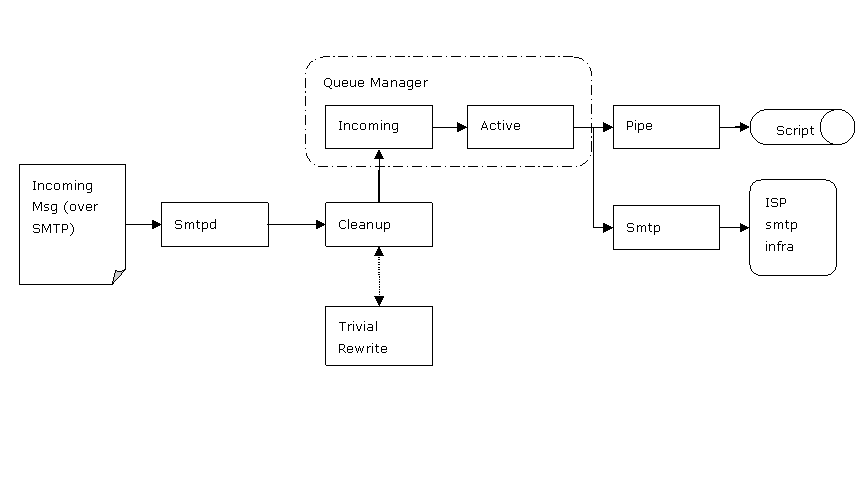 This schema provides an overview on how Postfix will work. Left Incoming (smtp) messages will be picked up by the Smtp-deamon. Then via "Cleanup" it will be handed over to the QueueManager, via the incoming queue. The Queuemanager will put the message on the Active queue. From there it will be picked up by either the smtp-service to forward the mail to the smtp-server on the infrastructure of your Internet Service Provider or your company. Using MA-records of the DNS-server it will determine to which smtp-server it has to be send actually.
In our use-case the pipe deamon is the interesting one. This is the one we're going to instruct to call a script.
Basic Settings
Hostname
The hostname command can be used to determine the fully qualified name. This is the one used by Postfix to determine the host. If this does not include the domain-name then the following command can be used to instruct Postfix what the FQN should be:
postconf -e myhostname=vmsmtp.darwin-it.local
Mydestination
This parameter can be left default. But if mail have to be accepted for certain domains and to be delivered using the local transport, set the following parameter in main.cf:
# 2010-02-03, M. vd. Akker: To have mail accepted for .darwin-it.local
mydestination = $myhostname, localhost.$mydomain, localhost, .darwin-it.local
For now leave it default:
mydestination = $myhostname, localhost.$mydomain, localhost
Network interfaces
To have mail from external networks, non-localhost, the inet_interfaces must be set in main.cf. In my case I run Postfix within a Virtual Machine. And I want to use my Thunderbird to send mail to Postfix. So first Postfix has to be told from which network-devices it should accept mail from. Since my VM is "hidden", for simplicity we accept mail from all network devices. But this can be narrowed down.
# RECEIVING MAIL

# The inet_interfaces parameter specifies the network interface
# addresses that this mail system receives mail on.  By default,
# the software claims all active interfaces on the machine. The
# parameter also controls delivery of mail to user@[ip.address].
#
# See also the proxy_interfaces parameter, for network addresses that
# are forwarded to us via a proxy or network address translator.
#
# Note: you need to stop/start Postfix when this parameter changes.
#
# 2010-02-10, M. van den Akker: Setup all interfaces for excepting mail.
inet_interfaces = all
#inet_interfaces = $myhostname
#inet_interfaces = $myhostname, localhost
#inet_interfaces = localhost
Specific domains to accept mail from are set with mynetworks parameters. To select sub-domains to accept mail from, change the mynetwork parameter to accept mail from your host for example.
# TRUST AND RELAY CONTROL

# The mynetworks parameter specifies the list of "trusted" SMTP
# clients that have more privileges than "strangers".
#
# In particular, "trusted" SMTP clients are allowed to relay mail
# through Postfix.  See the smtpd_recipient_restrictions parameter
# in postconf(5).
#
# You can specify the list of "trusted" network addresses by hand
# or you can let Postfix do it for you (which is the default).
#
# By default (mynetworks_style = subnet), Postfix "trusts" SMTP
# clients in the same IP subnetworks as the local machine.
# On Linux, this does works correctly only with interfaces specified
# with the "ifconfig" command.
#
# Specify "mynetworks_style = class" when Postfix should "trust" SMTP
# clients in the same IP class A/B/C networks as the local machine.
# Don't do this with a dialup site - it would cause Postfix to "trust"
# your entire provider's network.  Instead, specify an explicit
# mynetworks list by hand, as described below.
#
# Specify "mynetworks_style = host" when Postfix should "trust"
# only the local machine.
#
#mynetworks_style = class
#mynetworks_style = subnet
#mynetworks_style = host

# Alternatively, you can specify the mynetworks list by hand, in
# which case Postfix ignores the mynetworks_style setting.
#
# Specify an explicit list of network/netmask patterns, where the
# mask specifies the number of bits in the network part of a host
# address.
#
# You can also specify the absolute pathname of a pattern file instead
# of listing the patterns here. Specify type:table for table-based lookups
# (the value on the table right-hand side is not used).
#
# 2010-02-10, M. van den Akker: Setup for accepting mail from CMI and localhost.
mynetworks = 192.168.192.0/28, 127.0.0.0/8
#mynetworks = 168.100.189.0/28, 127.0.0.0/8
#mynetworks = $config_directory/mynetworks
#mynetworks = hash:/etc/postfix/network_table
Where 192.168.192.0/28 should be replaced by the address-range of the host(s) from which you want to be able to receive email.
Start and stop postfix
Postfix can be stopped by:
[root@vmsmtpserver postfix]# postfix stopPostfix can be started by:
[root@vmsmtpserver postfix]# postfix startIf it’s not already running.
After making changes to the configuration, Postfix has to be told to reload the configuration:
[root@vmsmtpserver postfix]# postfix reload
postfix/postfix-script: refreshing the Postfix mail system
Incoming e-Mail
Postfix will have to be configured that *.darwin-it.local will be seen as a domain for virtual mailbox addresses. The virtual transport has to be configured that these messages are handled by the pipe-deamon to call an external script.
We'll instruct Postfix also to enrich the smtp-message with two Custom properties:
- x-envelope-to: Recipient list from the SMTP-Header
- x-envelope-from: From-email-addres from the SMTP Header
Create a transport
To have incoming mail for .darwin-it.local transported to the script, a new transport has to be configured.
This is done in the master.cf file:
# 2010-02-10, M. van den Akker: Setup transport routescript for passing message to a bash-script
routescript   unix  -       n       n       -       -       pipe
flags=FDq. user=smtpuser argv=/bin/bash -c /home/smtpuser/routescript.sh -s $sender -r $recipient -q $nexthop -
Here a new transport is created, named “routescript”. It refers to the “pipe” deamon.
The “flags=FDq” denote that the From and destination addresses from the header are added to the header.
Change the following if necessary:
- The user denotes the unix-user that is used to run the script. In this case the unix-user “smtpuser” is used. Change it to the proper user (other than “root” or “postfix” ) .
- argv: denotes in this case that a bash script is called. Bash is called to run the routescript.sh script, that is placed in the home folder of the smtpuser. Change the path according to the correct location of the given script.
- The next parameters are parameters for the routemq.sh script:
- -s: the sender of the message, $sender refers to the from-address on the smtp-envelope
- -r: the recipient(s) of the message, $recipient refers to the to-list on the smtp-envelope
- -q: the queue on which the message has to be put. Our script was designed to queue the message on IBM mq. The property $nexthop refers to the nexthop property in the transport map. Having used this parameter to denote the particular queue enables us to change only the transport map if a queue is changed. Or reuse this transport for different queues in different transport mappings. This is a nice way to pass info about the actual/technical transport channel to be used.
To route the '.darwin-it.local' domain to the script a transport map has to be made in the transport file.
Add the following line to the transport map file:
# 2010-02-10, M. van den Akker: Setup transport routescript for handling darwin-it.local-messages.
.darwin-it.local routescript:queuename
Where queuename is the queue that is used for the smtp-messages. This is the 'nexthop'-parameter where the $nexthop property in the master.cf refers to.After having changed the transport map file, it has to be compiled into an indexed binary using the postmap tool. So execute the following command:
[root@vmsmtpserver postfix]# postmap transportDefine transport map
To have the transport map used by Postfix, add the following lines to the main.cf :
# 2010-02-10, M. van den Akker: use transport map
transport_maps=hash:/etc/postfix/transport
Routescript
Make sure that the routescript.sh as given in the appendix is placed on the location as defined in the master.cf above. In the example above it is: /home/smtpuser/routescript.sh
Make it owned by the user that is used by Postfix to execute the script (smtpuser).
Then make the script executable:
[smtpuser@vmsmtpserver postfix]$ chmod +x routescript.sh
The actual script as an example is given at the end of this article.
Outgoing e-Mail
All outgoing e-mail should be forwarded to your companies or ISP's smpt-infrastructure.
To do so set the relay-host parameter to the particular smtp-server in main.cf:
# INTERNET OR INTRANET

# The relayhost parameter specifies the default host to send mail to
# when no entry is matched in the optional transport(5) table. When
# no relayhost is given, mail is routed directly to the destination.
#
# On an intranet, specify the organizational domain name. If your
# internal DNS uses no MX records, specify the name of the intranet
# gateway host instead.
#
# In the case of SMTP, specify a domain, host, host:port, [host]:port,
# [address] or [address]:port; the form [host] turns off MX lookups.
#
# If you're connected via UUCP, see also the default_transport parameter.
#
#relayhost = $mydomain
#relayhost = [gateway.my.domain]
#relayhost = [mailserver.isp.tld]
#relayhost = uucphost
#relayhost = [an.ip.add.ress]
Restart Postfix
After having made the necessary changes above it is important to restart (stop and sart) Postfix. Just doing a reload of the config will probably not suffice.
Conclusion
It took me some time to understand Postfix. I was quite overwhelmed by the options. And it took me some time to figure out how to configure it for this particular usecase. Where I had to consult a co-worker (the one that sort of made up this use-case; thanks to Hugo). But as with most other things: after all it turns out to be simple. And it might be useful for many other cases.
Appendix: the routescript.sh
Below the script is given to be called by Postfix to route the messages. This script is designed to either output the message to a file or to an IBM mq client. The mq-client has to be installed from a licensed installment of IBM. IBM also provides the MA01-support pack, in which for several OS'es an compiled executable is provided. This executable (simply called 'q') provides a commandline interface to the IBM mq-client. The mq-client can put the message to a queue, but also to standard out. This is handy for testing, where no mq-client is available.
There are 2 lines to edit:
• Q=~/bin/ma01/q : give here the proper path the q-executable from the MA01-support pack
• fi|"$Q" -O "$QUEUE_NAME" : here the output of the if-block is outputted to the q-client using the queue-name. If the queue is not available in test-environment this will give an error. For test purposes it might be usefull to comment this line use (uncomment) either the line '#fi|"$Q" -s' to have the q-client output the message to STDOUT, or '#fi>$FILENAME' to have the output directed to file.
The script will exit with the result code of the last command, which is the q-client. If that one fails, the script with exit with the result-code telling Postfix to consider the call failed. Postfix will consider the message undelivered and retry it later.
#!/bin/bash
###################################################################################################
# Route messages.
# Script to route an email message, read from pipe and output it to a channel.
#
# author: Martien van den Akker
# (C) januari 2010
# Darwin-IT Professionals
###################################################################################################
#Declartions
E_WRONG_ARGS=85;
NUMBER_OF_EXPECTED_ARGS=6;
FILENAME=/tmp/routemq-`date +%Y%m%d-%H%M%S.%N`
Q=~/bin/ma01/q
TRUE=1
HDR_ENV_FROM="x-envelope-from"
HDR_ENV_TO="x-envelope-to"

#Function to display usage
usage(){
SCRIPT_PARAMETERS="-r receiver -s sender -q queuename";
USAGE="Usage: `basename $0` $SCRIPT_PARAMETERS";
echo $USAGE;
}

# Check Arguments
if [ $# -lt $NUMBER_OF_EXPECTED_ARGS ]
then
usage
exit $E_WRONG_ARGS;
fi
until [ -z "$1" ]
do
case $1 in
"-s") SENDER=$2;;
"-r") RECEIVER=$2;;
"-q") QUEUE_NAME=$2;;
* ) usage;
exit $E_WRONG_ARGS;;
esac;
shift 2;
done;

#echo header variables and cat stdin to output.
#Edit next line to give the proper full path to the “q”-executable from the MA01-support-pack
if [ "$TRUE" ]
then
echo "$HDR_ENV_FROM: $SENDER"
echo "$HDR_ENV_TO: $RECEIVER"
cat -
fi|"$Q"  -O "$QUEUE_NAME" #  uncomment to output to $QUEUENAME (Comment previous line)
#fi|"$Q" -s # only output to stdout
#fi>$FILENAME #uncomment to output to filename

exit $? #Exit with result-code of last command, which is the "q" command.