Monday, 27 August 2018

OracleJET at the #PaaSSummerCamp

Today the Oracle OPN #PaaSSummerCamp is started. And I have the privilege to join @GeertjanW to kick-off the Application Development and containers track with an OracleJET training.

OracleJET is Oracle's JavaScript Extension Toolkit, that bundles popular JavaScript frameworks in a toolkit (not a framework) that allows you to QuickStart a JavaScript project.

One of the advantages is that you don't have to bother about which Frameworks you should use and how to setup your project. Geertjan cooked up a workshop with a series of labs that introduces you to OracleJET up to the point that you have a working CRUD (Create, Retrieve, Update and Delete enabled) application.

It's all on GitHub and the nice thing is: you can do the labs too, even if you weren't able to come to the Beautiful Lisbon area and attend the #PaaSSummerCamp. You even don't need to go to Oracle OpenWorld to do this workshop, because it all can be found here. You'll learn how to quickly build a OracleJET 5.2.0 based application.

What do you need? Well, not much. A laptop or desktop computer will help of course. The lab will support you in installing:


  • npm 5.6.0
  • a json-server REST/JSON Mock server
  • ojet 5.2.0 command line interface
You can use any IDE or source editor you want, for instance Notepad or Notepad++, IntelliJ or JDeveloper if you like. But I found Netbeans 8.2 very convenient for OJET Development. Note that Oracle is handing over Netbeans to the Apache Foundation, where NetBeans 9.0 just have been released.

Wednesday, 22 August 2018

Weblogic 12c: Solving Invalid Template error

One of the labs in our Weblogic Advanced Administration 12c course is about using domain templates. When revising the particular lab, we created a domain in Weblogic 12c and then created a template based on the domain. On recreation of the domain based on the template we get an exception:
This we get regardless of if we provide nodemanager details at the initial creation of the domain.

We did some investigation and found for instance this forum,  that gave a hint, but not a solution or workaround.

One important hint is the message 'config-nodemanager.xml: failed to parse the template!(/home/rcma/rcma_domain_template.jar): Parsing the config-nodemanager.xml failed!'. So it relates to the nodemanager configuration and the contents of the config-nodemanager.xml file in the template.

By the way, my colleague found that the same issue can also be experienced during pack and unpack, as desribed in Oracle support note 2311027.1. Here you can find that the problem in the config-nodemanager.xml is about the password. If you have a nodemanager password set in the domain's config.xml, it is encrypted with the domain's seed/salt. It can't be decrypted and read by the domain configurator or unpack tools, because they don't have the salt of the source domain.

So, what is the work-around or solution? I see two:
  1. Following the before mentioned support note, you can replace the nodemanager password in the ${SourceDomainHome}/config/config.xml in the  <node-manager-password-encrypted>******</node-manager-password-encrypted> element with a clear text password. Do the same in the <nod:password>******</nod:password> element in the ${SourceDomainHome}/init-info/config-nodemanager.xml. 
  2. Open the templates jar file:
    Then Extract the config-nodemanager.xml from it and edit it:
    <?xml version="1.0" encoding="UTF-8"?>
    <nod:nodeManagerInfo xmlns:nod="http://xmlns.oracle.com/cie/nodemanager">
      <nod:userName>weblogic</nod:userName>
      <nod:password>{AES}6eu/SDW2GBcb4R2lZgBD1hJVzN7UXQw+w4o46wfvHlk=</nod:password>
      <nod:nodeManagerHome>/app/work/domains/AA2Domain/nodemanager</nod:nodeManagerHome>
      <nod:perDomainNodeManager>true</nod:perDomainNodeManager>
      <nod:customLocationNodeManager>false</nod:customLocationNodeManager>
      <nod:manualNodeManagerSetup>false</nod:manualNodeManagerSetup>
    </nod:nodeManagerInfo>
    replace the password with something readable, for instance:
    <?xml version="1.0" encoding="UTF-8"?>
    <nod:nodeManagerInfo xmlns:nod="http://xmlns.oracle.com/cie/nodemanager">
      <nod:userName>weblogic</nod:userName>
      <nod:password>DoesNotNecessarilyBeAMatchingPassword2018</nod:password>
      <nod:nodeManagerHome>/app/work/domains/AA2Domain/nodemanager</nod:nodeManagerHome>
      <nod:perDomainNodeManager>true</nod:perDomainNodeManager>
      <nod:customLocationNodeManager>false</nod:customLocationNodeManager>
      <nod:manualNodeManagerSetup>false</nod:manualNodeManagerSetup>
    </nod:nodeManagerInfo>
    The password does not necessarily be the actual password of the source environment (at least with the template, not sure in case of pack/unpack). Then re-package the file into the template.
I tested the second work-around, not the one suggested by the note. I actually prefer the second option, since the first option suggest updating the source domain, which I'd rather prevent to do.
Since you do need to do a change, why not change the template? This we tested succesfully.

Another issue solved. Well, actually not really. This is a workaround and the Weblogic tooling should prevent this from happening. You should be able to enter a nodemanager password that is added to the template, or you should be asked for a password at unpack or domain creation. In fact, at creation of a new domain based on the template, you are asked for a nodemanager password. So, why would the domain configurator even bother about trying to read the nodemanager password and/or fail at parsing the file?

If I'd be so honoured to have this blog be read to a product manager or developer of Weblogic, could you take a look into this? Thanks!

Monday, 23 July 2018

FMW July 2018 patchesets for 11g and 12c releases

I just noticed via community.oracle.com  that bundlepatches and patchset updates for several products in the FusionMiddleware portfolio are released. And thus also for SOA and BPM Suite. You can read more on it in this blog.

Since SOA/BPM Suite 12.2.1.3 is around for quite some time (since fall 2017 I believe) and I've not heard on a 12.2.1.4 or even 18.x release, I found this quite important. So I took a quick look in the patch set for SOASuite 12.2.1.3 and found some interesting patches. I'd recommend applying this one, where some patches seem to apply for the QuickStart as well.

If you're on 12.2.1.2 or earlier, I surely recommend upgrade to 12.2.1.3 and apply this patch set.

Don't spend your summer vacation for it, but schedule it for applying it first thing at return. Or better: do it right before you leave!

Tuesday, 17 July 2018

Nimbus Look&Feel in SQLDeveloper and JDeveloper!

Recently SQLDeveloper 18.2 has been released. Who knew it will grow into this, when it was introduced as Project Raptor; wasn't it in 2005?

On his introduction of this released, Jeff Smith also showed off with the Nimbus Look&Feel:

Somehow, it reminds me of the 'new' Oracle Forms Look and Feel, introduced somewhere at Forms version 6 or 6i... I must admit, I find it kind of nice. I'm curious if we could decorate other clients with the same look and feel. Let's see if it works for JDeveloper.

First, Jeff Smith suggest to add the following line:
AddVMOption -Dswing.defaultlaf=com.sun.java.swing.plaf.nimbus.NimbusLookAndFeel

to the product.conf, to be found at Windows user home => AppData => Roaming => ‘SQL Developer’, 18.2 folder. However, I could not find it there.
But knowing JDeveloper, I added the line in the ide.conf at ${SQLDeveloper18.2-home}\ide\bin\, for instance c:\oracle\SQLDeveloper\sqldeveloper-18.2.0.183.1748-no-jre\ide\bin\.

I could not resist to add the same line in the ide.conf of my SOAQuickStart installation:


It took quite sometime to start, so I'm not sure it is workable. As Jeff said: it is not supported. But it is fresh... 😉

Thursday, 12 July 2018

SOASuite12c - BPEL: JTA transaction is not in active state

Yesterday I ran into this pretty weird problem.

A bit of context...

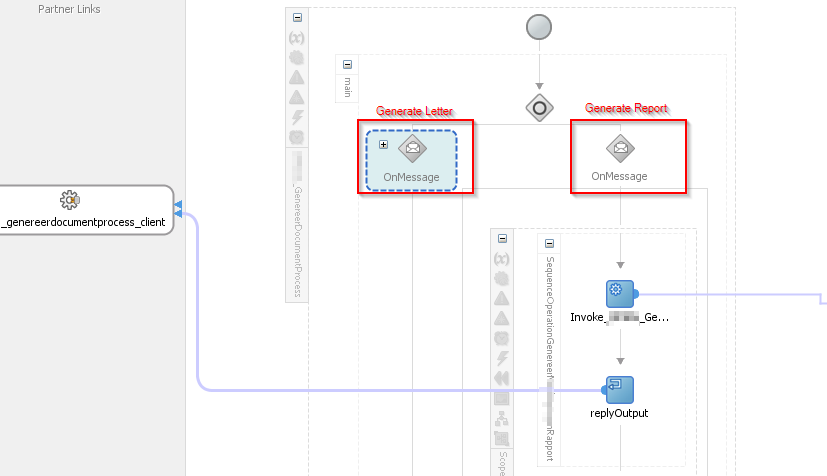
I have two BPEL services to generate documents using BIP. One I created earlier that is based on a generic XML used by BIP to generate multiple letters. Now I had to create another one that is a report, so uses another XML. I generated an XSD for both XML's but since they haven't got a namespace, but same element names, I can't have them in the same composite. So, I duplicated the code.

I created a WSDL with two operations, one for the letters and one for the report, so I wanted to call the report from the service that created the letters. The first service is called 'GenerateDocument', but with an operation 'GenerateLetter', but with an added operation 'GenerateReport'.

So I changed the BPEL and replaced the 'Receive' by a Pick:
In the invoke it calls the 'GenerateReport' BPEL service, that does basically exact the same as in the scope under the 'Generate Letter' OnMessage.

In the 'GenerateReport' BPEL service (and from the 'Generate Letter' scope) I call a Base64Encoding service. It gets an XML in, and it will encode it to string using ora:getContentAsString() and encode that using a Spring bean, based on a quite simple java bean:


But now the problem...


So, called seperately, the 'Generate Report' service functioned just fine. Also the 'Generate Letter' operation of the 'Generate Document' service, thus the 'Generate Lettter' OnMessage from the Pick above, function just fine. But, when I call the 'Generate Document' service using the 'Generate Report' operation, resulting in the other OnMessage I'll get the following message on return from the Base64Encoding service:
<exception class="com.collaxa.cube.engine.EngineException">JTA transaction is not in active state.
The transaction became inactive when executing activity "" for instance "60,004", bpel engine can not proceed further without an active transaction. please debug the invoked subsystem on why the transaction is not in active status. the transaction status is "MARKED_ROLLBACK".
The reason was The execution of this instance "60004" for process "MyFancyProcess" is supposed to be in an active jta transaction, the current transaction status is "MARKED_ROLLBACK", the underlying exception is "EJB Exception: " .
Consult the system administrator regarding this error.
<stack>
            <f>com.oracle.bpel.client.util.TransactionUtils.throwExceptionIfTxnNotActive#126</f>
            <f>com.collaxa.cube.ws.WSInvocationManager.invoke#398</f>
            <f>com.collaxa.cube.engine.ext.common.InvokeHandler.__invoke#1460</f>
            <f>com.collaxa.cube.engine.ext.common.InvokeHandler.handleNormalWSDLInvoke#806</f>
            <f>com.collaxa.cube.engine.ext.common.InvokeHandler.handleNormalInvoke#497</f>
            <f>com.collaxa.cube.engine.ext.common.InvokeHandler.handle#158</f>
            <f>com.collaxa.cube.engine.ext.bpel.common.wmp.BPELInvokeWMP.__executeStatements#78</f>
            <f>com.collaxa.cube.engine.ext.bpel.common.wmp.BaseBPELActivityWMP$1.call#197</f>
            <f>com.collaxa.cube.engine.ext.bpel.common.wmp.BaseBPELActivityWMP$1.call#195</f>
            <f>com.collaxa.bpel.sws.SWSComponentProcessActivityWrapper$1.call#74</f>
            <f>com.collaxa.bpel.sws.SWSCallableActivityWrapper.execute#89</f>
            <f>com.collaxa.bpel.sws.SWSComponentProcessActivityWrapper.execute#82</f>
            <f>com.collaxa.cube.engine.ext.bpel.common.wmp.BaseBPELActivityWMP.perform#205</f>
            <f>com.collaxa.cube.engine.CubeEngine.performActivity#2922</f>
            <f>com.collaxa.cube.engine.CubeEngine._handleWorkItem#1289</f>
            <f>com.collaxa.cube.engine.CubeEngine.handleWorkItem#1178</f>
            <f>...</f>
         </stack>
      </exception>
<root class="oracle.fabric.common.FabricInvocationException">EJB Exception: <stack>
            <f>oracle.fabric.CubeServiceEngine.handleRequestResponseServerException#3920</f>
            <f>oracle.fabric.CubeServiceEngine.request#653</f>
            <f>oracle.integration.platform.blocks.mesh.SynchronousMessageHandler.doRequest#151</f>
            <f>oracle.integration.platform.blocks.mesh.MessageRouter.request#217</f>
            <f>oracle.integration.platform.blocks.mesh.MeshImpl.request#283</f>
            <f>sun.reflect.NativeMethodAccessorImpl.invoke0</f>
            <f>sun.reflect.NativeMethodAccessorImpl.invoke#62</f>
            <f>sun.reflect.DelegatingMethodAccessorImpl.invoke#43</f>
            <f>java.lang.reflect.Method.invoke#498</f>
            <f>org.springframework.aop.support.AopUtils.invokeJoinpointUsingReflection#318</f>
            <f>org.springframework.aop.framework.ReflectiveMethodInvocation.invokeJoinpoint#183</f>
            <f>org.springframework.aop.framework.ReflectiveMethodInvocation.proceed#150</f>
            <f>oracle.integration.platform.metrics.PhaseEventAspect.invoke#57</f>
            <f>org.springframework.aop.framework.ReflectiveMethodInvocation.proceed#172</f>
            <f>org.springframework.aop.framework.JdkDynamicAopProxy.invoke#202</f>
            <f>com.sun.proxy.$Proxy428.request</f>
            <f>...</f>
         </stack>
      </root>
   </fault>
</messages>

Most blogs or forums I found suggest increasing the JTA time out, as this one. However, in those cases also the time out is mentioned as a cause in the exception.
In my case though, there's no mention of a time-out. Nevertheless I did try the suggestion, but as expected, with no luck.

The investigation

How to proceed? Well, in those cases, I just 'undress' or 'strip-down' my code. Cut out all code to the point it works again. Then, piece by piece, I dress it again, until the point it breaks again. That way you can narrow to the exact point where it goes wrong.

It turns out it indeed just breaks again when I add the scope with the call to the Base64Encoding service. So, I had to investigate that a bit further. I fiddled with the transaction properties of the Exposed Service:
I don't want transaction support in this service actually: it doesn't do anything that needs to be transacted. But this wasn't it either.

A closer look to the composite then:
...
  <component name="Base64Process" version="2.0">
    <implementation.bpel src="BPEL/Base64Process.bpel"/>
    <componentType>
      <service name="base64process_client_ep" ui:wsdlLocation="WSDLs/Base64ServiceWrapper.wsdl">
        <interface.wsdl interface="http://nl.darwin-it.service/wsdl/Base64Service/1.0#wsdl.interface(Base64ServicePortType)"/>
      </service>
      <reference name="Based64EncoderDecoder.Base64EncoderDecoder"
                 ui:wsdlLocation="WSDLs/IBase64EncoderDecoderWrapper.wsdl">
        <interface.wsdl interface="http://base64.utils.darwin-it.nl/#wsdl.interface(IBase64EncoderDecoder)"/>
      </reference>
    </componentType>
    <property name="bpel.config.transaction" type="xs:string" many="false">required</property>
    <property name="bpel.config.completionPersistPolicy" type="xs:string" many="false">deferred</property>
  </component>
  <component name="Based64EncoderDecoder">
    <implementation.spring src="Spring/Based64EncoderDecoder.xml"/>
    <componentType>
      <service name="Base64EncoderDecoder">
        <interface.java interface="nl.darwin-it.utils.base64.IBase64EncoderDecoder"/>
      </service>
    </componentType>
  </component>
...

And there my the following caught my eye:
...
  <component name="Base64Process" version="2.0">
...
    <property name="bpel.config.transaction" type="xs:string" many="false">required</property>
    <property name="bpel.config.completionPersistPolicy" type="xs:string" many="false">deferred</property>
  </component>

...

As said, I don't want a transaction, and I'm not interested in deferred persistence. So, I commented this out, and all worked.

What did I learn?

I'm not sure. But apparently, when called from the main-flow directly, these properties don't hurt. The BPEL Engine doesn't feel the need to do a persist directly and therefor a transaction. But with one level deeper, called from another flow, on return from the Base64Encoding flow, it just felt the need to do a persist and thus needed a transaction. That was not there.

All the services in the composition of the 3 composites (GenerateDocument -> GenerateReport -> Base64Encoding) are synchronous, created with default settings. And therefor I did not expect this behavior.


Tuesday, 12 June 2018

The Medrec 12.2.1.3 Datamodel DDL

Next week I deliver the training 'Weblogic 12c Tuning and Troubleshooting' . One of the labs is to have the sample application MedRec generate Stuck Threads, so that the students can investigate and try to solve that. Or actually configure the server so that it will cause a automatic restart.

To do so I have to deliberately break the application and so I need the source. I have an earlier version of the application, but not the sources. So I have to go to the latest MedRec. I actually like that, because it looks more modern.

The MedRec application is available if you install WebLogic with samples.

You can run the script demo_oracle.ddl  from against the database:
$WL_HOME/samples/server/examples/src/examples/common/ddl

The medrec.ear can be found at:
$WL_HOME/samples/server/medrec/dist/standalone

I ran in quite some confusion and frustration, but I found that this combination, although from the same samples folder, does not work. Not only this medrec.ear expects the tables in plural (PRESCRIPTIONS) where the script creates them in singular (PRESCRIPTION), it expects a separate DRUGS table with a foreign key column DRUG_ID in PRESCRIPTIONS.  And a few other changes.

I had a version of the scripts from earlier versions of WebLogic's MedRec. Based the exceptions in the server log, I refactored/reverse engineered the scripts.

Using those I could succesfully login and view the Patient records of fred@golf.com:


First we need to create a a schema using createDBUserMedrec.sql:
prompt Create user medrec with connect, resource roles;
grant connect, resource to medrec identified by  welcome1;
alter user medrec 
default tablespace users
temporary tablespace temp; 
alter user medrec quota unlimited on users;

Drop tables (if needed) using medrec_dropall.sql:
DROP TABLE "MEDREC"."ADMINISTRATORS";

DROP TABLE "MEDREC"."OPENJPA_SEQUENCE_TABLE"; 

DROP TABLE "MEDREC"."PATIENTS";

DROP TABLE "MEDREC"."PATIENTS_RECORDS";

DROP TABLE "MEDREC"."PHYSICIANS";

DROP TABLE "MEDREC"."PRESCRIPTIONS";

DROP TABLE "MEDREC"."DRUGS";

DROP TABLE "MEDREC"."RECORDS";

DROP TABLE "MEDREC"."RECORDS_PRESCRIPTIONS";

Create the tables using medrec_tables.sql:
CREATE TABLE "MEDREC"."ADMINISTRATORS" (
   "ID" INTEGER NOT NULL,
   "EMAIL" VARCHAR(255),
   "PASSWORD" VARCHAR(255),
   "USERNAME" VARCHAR(255),
   "VERSION" INTEGER,
   PRIMARY KEY ( "ID" ) );


CREATE TABLE "MEDREC"."OPENJPA_SEQUENCE_TABLE" (
   "ID" SMALLINT NOT NULL,
   "SEQUENCE_VALUE" INTEGER,
   PRIMARY KEY ( "ID" ) );


CREATE TABLE "MEDREC"."PATIENTS" (
   "ID" INTEGER NOT NULL,
   "EMAIL" VARCHAR(255),
   "PASSWORD" VARCHAR(255),
   "USERNAME" VARCHAR(255),
   "PHONE" VARCHAR(255),
   "DOB" TIMESTAMP,
   "GENDER" VARCHAR(20),
   "SSN" VARCHAR(255),
   "STATUS" VARCHAR(20),
   "VERSION" INTEGER,
   "FIRSTNAME" VARCHAR(255),
   "LASTNAME" VARCHAR(255),
   "MIDDLENAME" VARCHAR(255),
   "CITY" VARCHAR(255),
   "COUNTRY" VARCHAR(255),
   "STATE" VARCHAR(255),
   "STREET1" VARCHAR(255),
   "STREET2" VARCHAR(255),
   "ZIP" VARCHAR(255),
   PRIMARY KEY ( "ID" ) );


CREATE TABLE "MEDREC"."PATIENTS_RECORDS" (
   "PATIENT_ID" INTEGER,
   "RECORDS_ID" INTEGER );


CREATE TABLE "MEDREC"."PHYSICIANS" (
   "ID" INTEGER NOT NULL,
   "EMAIL" VARCHAR(255),
   "PASSWORD" VARCHAR(255),
   "USERNAME" VARCHAR(255),
   "PHONE" VARCHAR(255),
   "VERSION" INTEGER,
   "FIRSTNAME" VARCHAR(255),
   "LASTNAME" VARCHAR(255),
   "MIDDLENAME" VARCHAR(255),
   PRIMARY KEY ( "ID" ) );


CREATE TABLE "MEDREC"."DRUGS" 
   ( "ID" NUMBER(*,0) NOT NULL ENABLE, 
 "NAME" VARCHAR2(255 BYTE), 
 "FREQUENCY" VARCHAR2(255 BYTE), 
    "PRICE" NUMBER(10,2),
 "VERSION" NUMBER(*,0),
   PRIMARY KEY ( "ID" ) );


CREATE TABLE "MEDREC"."PRESCRIPTIONS" (
   "ID" INTEGER NOT NULL,
   "DATE_PRESCRIBED" TIMESTAMP,
   "FREQUENCY" VARCHAR(255),
   "INSTRUCTIONS" VARCHAR(255),
   "REFILLS_REMAINING" INTEGER,
   "VERSION" INTEGER,
   "DOSAGE" NUMBER, 
   "DRUG_ID" NUMBER, 
   PRIMARY KEY ( "ID" ) );

CREATE TABLE "MEDREC"."RECORDS" (
   "ID" INTEGER NOT NULL,
   "CREATE_DATE" TIMESTAMP,
   "RECORDDATE" TIMESTAMP,
   "DIAGNOSIS" VARCHAR(255),
   "NOTES" VARCHAR(255),
   "SYMPTOMS" VARCHAR(255),
   "VERSION" INTEGER,
   "PATIENT_ID" INTEGER NOT NULL,
   "PHYSICIAN_ID" INTEGER NOT NULL,
   "DIASTOLIC_BLOOD_PRESSURE" INTEGER,
   "HEIGHT" INTEGER,
   "PULSE" INTEGER,
   "SYSTOLIC_BLOOD_PRESSURE" INTEGER,
   "TEMPERATURE" INTEGER,
   "WEIGHT" INTEGER,
   PRIMARY KEY ( "ID" ) );

CREATE TABLE "MEDREC"."RECORDS_PRESCRIPTIONS" (
   "RECORD_ID" INTEGER,
   "PRESCRIPTIONS_ID" INTEGER );


Insert data using medrec_data.sql:
INSERT INTO "MEDREC"."ADMINISTRATORS" (
"ID", "EMAIL", "PASSWORD", "USERNAME", "VERSION" )
VALUES (
201,'admin@avitek.com','weblogic','admin@avitek.com',1
);

COMMIT;

INSERT INTO "MEDREC"."OPENJPA_SEQUENCE_TABLE" (
"ID", "SEQUENCE_VALUE" )
VALUES (
0,251
);

COMMIT;

INSERT INTO "MEDREC"."PATIENTS"
VALUES (
51,'page@fish.com','weblogic','page@fish.com','4151234564',
TIMESTAMP '1972-03-18 00:00:00','MALE','888888888','APPROVED',3,
'Page','Trout','A','Ponte Verde','United States','FL',
'235 Montgomery St','Suite 15','32301'
);
INSERT INTO "MEDREC"."PATIENTS"
VALUES (
52,'fred@golf.com','weblogic','fred@golf.com','4151234564',
TIMESTAMP '1965-04-26 00:00:00','MALE','123456789','APPROVED',3,
'Fred','Winner','I','San Francisco','United States','CA',
'1224 Post St','Suite 100','94115'
);
INSERT INTO "MEDREC"."PATIENTS"
VALUES (
53,'volley@ball.com','weblogic','volley@ball.com','4151234564',
TIMESTAMP '1971-09-17 00:00:00','MALE','333333333','APPROVED',3,
'Gabrielle','Spiker','H','San Francisco','United States','CA',
'1224 Post St','Suite 100','94115'
);
INSERT INTO "MEDREC"."PATIENTS"
VALUES (
54,'charlie@star.com','weblogic','charlie@star.com','4151234564',
TIMESTAMP '1973-11-29 00:00:00','MALE','444444444','REGISTERED',3,
'Charlie','Florida','E','Ponte Verde','United States','FL',
'235 Montgomery St','Suite 15','32301'
);
INSERT INTO "MEDREC"."PATIENTS"
VALUES (
55,'larry@bball.com','weblogic','larry@bball.com','4151234564',
TIMESTAMP '1959-03-13 00:00:00','MALE','777777777','APPROVED',3,
'Larry','Parrot','J','San Francisco','United States','CA',
'1224 Post St','Suite 100','94115'
);

COMMIT;

INSERT INTO "MEDREC"."PHYSICIANS" (
"ID", "EMAIL", "PASSWORD", "USERNAME", "PHONE", "VERSION", "FIRSTNAME", "LASTNAME", "MIDDLENAME" )
VALUES (
1,'mary@md.com','weblogic','mary@md.com','1234567812',4,'Mary','Oblige','J'
);

COMMIT;

Insert into "MEDREC"."DRUGS"  (ID,NAME,FREQUENCY,PRICE,VERSION) values (101,'Advil','1/4hrs',1.0, 2);
Insert into "MEDREC"."DRUGS"  (ID,NAME,FREQUENCY,PRICE,VERSION) values (102,'Codeine','1/6hrs',2.5,2);
Insert into "MEDREC"."DRUGS"  (ID,NAME,FREQUENCY,PRICE,VERSION) values (103,'Drixoral','1tspn/4hrs',3.75,2);

COMMIT;

Insert into "MEDREC"."PRESCRIPTIONS"  (ID,DATE_PRESCRIBED,FREQUENCY,INSTRUCTIONS,REFILLS_REMAINING,VERSION,DOSAGE,DRUG_ID) values (101,to_timestamp('18-JUL-99 12.00.00.000000000 AM','DD-MON-RR HH.MI.SSXFF AM'),'1/4hrs',null,0,2,1,101);
Insert into "MEDREC"."PRESCRIPTIONS"  (ID,DATE_PRESCRIBED,FREQUENCY,INSTRUCTIONS,REFILLS_REMAINING,VERSION,DOSAGE,DRUG_ID) values (102,to_timestamp('30-JUN-93 12.00.00.000000000 AM','DD-MON-RR HH.MI.SSXFF AM'),'1/6hrs',null,1,2,1,102);
Insert into "MEDREC"."PRESCRIPTIONS"  (ID,DATE_PRESCRIBED,FREQUENCY,INSTRUCTIONS,REFILLS_REMAINING,VERSION,DOSAGE,DRUG_ID) values (103,to_timestamp('18-JUL-99 12.00.00.000000000 AM','DD-MON-RR HH.MI.SSXFF AM'),'1tspn/4hrs',null,0,2,1,103);


COMMIT;

INSERT INTO "MEDREC"."RECORDS"
VALUES (
151,TIMESTAMP '1991-05-01 00:00:00',TIMESTAMP '1991-05-01 00:00:00','Allergic to coffee. Drink tea.',
'','Drowsy all day.',2,51,1,85,70,75,125,98,180
);
INSERT INTO "MEDREC"."RECORDS"
VALUES (
152,TIMESTAMP '1991-05-01 00:00:00',TIMESTAMP '1991-05-01 00:00:00','Light cast needed.',
'At least 20 sprained ankles since 15.','Sprained ankle.',
2,53,1,85,70,75,125,98,180
);
INSERT INTO "MEDREC"."RECORDS"
VALUES (
153,TIMESTAMP '1989-08-05 00:00:00',TIMESTAMP '1989-08-05 00:00:00','Severely sprained interior ligament. Surgery required.','Cast will be necessary before and after.','Twisted knee while playing soccer.',2,52,1,85,70,75,125,98,180
);
INSERT INTO "MEDREC"."RECORDS"
VALUES (
154,TIMESTAMP '1993-06-30 00:00:00',TIMESTAMP '1993-06-30 00:00:00','Common cold. Prescribed codiene cough syrup.','Call back if not better in 10 days.','Sneezing, coughing, stuffy head.',2,52,1,85,70,75,125,98,180
);
INSERT INTO "MEDREC"."RECORDS"
VALUES (
155,TIMESTAMP '1999-07-18 00:00:00',TIMESTAMP '1999-07-18 00:00:00','Mild stroke.  Aspirin advised.','Patient needs to stop smoking.','Complains about chest pain.',2,52,1,85,70,75,125,98,180
);
INSERT INTO "MEDREC"."RECORDS"
VALUES (
156,TIMESTAMP '1991-05-01 00:00:00',TIMESTAMP '1991-05-01 00:00:00','Patient is crazy.  Recommend politics.','','Overjoyed with everything.',2,55,1,85,70,75,125,98,180
);

COMMIT;

INSERT INTO "MEDREC"."RECORDS_PRESCRIPTIONS"
VALUES (
154,102
);
INSERT INTO "MEDREC"."RECORDS_PRESCRIPTIONS"
VALUES (
155,101
);
INSERT INTO "MEDREC"."RECORDS_PRESCRIPTIONS"
VALUES (
155,103
);

COMMIT;
To install the datasource you can use this wlst script, createDataSource.py:
#############################################################################
# Create DataSource for WLS 12c Tuning & Troubleshooting workshop
#
# @author Martien van den Akker, Darwin-IT Professionals
# @version 1.1, 2018-01-22
#
#############################################################################
# Modify these values as necessary
import os,sys, traceback
scriptName = sys.argv[0]
adminHost=os.environ["ADM_HOST"]
adminPort=os.environ["ADM_PORT"]
admServerUrl = 't3://'+adminHost+':'+adminPort
ttServerName=os.environ["TTSVR_NAME"]
adminUser='weblogic'
adminPwd='welcome1'
#
dsName = 'MedRecGlobalDataSourceXA'
dsJNDIName = 'jdbc/MedRecGlobalDataSourceXA'
initialCapacity = 5
maxCapacity = 10
capacityIncrement = 1
driverName = 'oracle.jdbc.xa.client.OracleXADataSource'
dbUrl = 'jdbc:oracle:thin:@darlin-vce.darwin-it.local:1521:orcl'
dbUser = 'medrec'
dbPassword = 'welcome1'
#
def createDataSource(dsName, dsJNDIName, initialCapacity, maxCapacity, capacityIncrement, dbUser, dbPassword, dbUrl, targetSvrName):
  # Check if data source already exists
  try:
    cd('/JDBCSystemResources/' + dsName)
    print 'The JDBC Data Source ' + dsName + ' already exists.'
    jdbcSystemResource=cmo
  except WLSTException:
    print 'Creating new JDBC Data Source named ' + dsName + '.'
    edit()
    startEdit()
    cd('/')
    # Create data source
    jdbcSystemResource = create(dsName, 'JDBCSystemResource')
    jdbcResource = jdbcSystemResource.getJDBCResource()
    jdbcResource.setName(dsName)
    # Set JNDI name
    jdbcResourceParameters = jdbcResource.getJDBCDataSourceParams()
    jdbcResourceParameters.setJNDINames([dsJNDIName])
    jdbcResourceParameters.setGlobalTransactionsProtocol('TwoPhaseCommit')
    # Create connection pool
    connectionPool = jdbcResource.getJDBCConnectionPoolParams()
    connectionPool.setInitialCapacity(initialCapacity)
    connectionPool.setMaxCapacity(maxCapacity)
    connectionPool.setCapacityIncrement(capacityIncrement)
    # Create driver settings
    driver = jdbcResource.getJDBCDriverParams()
    driver.setDriverName(driverName)
    driver.setUrl(dbUrl)
    driver.setPassword(dbPassword)
    driverProperties = driver.getProperties()
    userProperty = driverProperties.createProperty('user')
    userProperty.setValue(dbUser)
    # Set data source target
    targetServer = getMBean('/Servers/' + targetSvrName)
    jdbcSystemResource.addTarget(targetServer)
    # Activate changes
    save()
    activate(block='true')
    print 'Data Source created successfully.'
  return jdbcSystemResource

def main():
  # Connect to administration server
  try:
    connect(adminUser, adminPwd, admServerUrl)
    #
    createDataSource(dsName, dsJNDIName, initialCapacity, maxCapacity, capacityIncrement, dbUser, dbPassword, dbUrl,ttServerName)
    #    
    print("\nExiting...")
    exit()
  except:
    apply(traceback.print_exception, sys.exc_info())
    exit(exitcode=1)
#call main()
main()

Also Medrec needs an administrative user, createUser.py:
print 'starting the script ....'
#
adminHost=os.environ["ADM_HOST"]
adminPort=os.environ["ADM_PORT"]
admServerUrl = 't3://'+adminHost+':'+adminPort
#
adminUser='weblogic'
adminPwd='welcome1'
#
realmName = 'myrealm' 
#
def addUser(realm,username,password,description):
  print 'Prepare User',username,'...'
  if realm is not None:
    authenticator = realm.lookupAuthenticationProvider("DefaultAuthenticator")
    if authenticator.userExists(username)==1:
      print '[Warning]User',username,'has been existed.'
    else:
      authenticator.createUser(username,password,description)
      print '[INFO]User',username,'has been created successfully'


connect(adminUser,adminPwd,admServerUrl)

security=getMBean('/').getSecurityConfiguration()
realm=security.lookupRealm(realmName)
addUser(realm,'administrator','administrator123','MedRec Administrator')

disconnect()


Deploy the medrec application, deployMedRec.py:
#############################################################################
# Deploy MedRec for WLS 12c Tuning & Troubleshooting workshop
#
# @author Martien van den Akker, Darwin-IT Professionals
# @version 1.0, 2018-01-22
#
#############################################################################
# Modify these values as necessary
import os,sys, traceback
scriptName = sys.argv[0]
adminHost=os.environ["ADM_HOST"]
adminPort=os.environ["ADM_PORT"]
admServerUrl = 't3://'+adminHost+':'+adminPort
ttServerName=os.environ["TTSVR_NAME"]
adminUser='weblogic'
adminPwd='welcome1'
#
appName = 'medrec'
appSource = '../ear/medrec.ear'
#
# Deploy the application
def deployApplication(appName, appSource, targetServerName):
  print 'Deploying application ' + appName + '.'
  progress = deploy(appName=appName,path=appSource,targets=targetServerName)
  # Wait for deploy to complete
  while progress.isRunning():
   pass
  print 'Application ' + appName + ' deployed.'
#
#
def main():
  # Connect to administration server
  try:
    connect(adminUser, adminPwd, admServerUrl)
    #
    deployApplication(appName, appSource, ttServerName)
    #    
    print("\nExiting...")
    exit()
  except:
    apply(traceback.print_exception, sys.exc_info())
    exit(exitcode=1)
#call main()
main()


Monday, 11 June 2018

Add Weblogic12c Vagrant project

Last week I proudly presented a talk on  how to create, provision and maintain VMs with Vagrant, including installing Oracle software (Database, FusionMiddlware,etc.). It was during the nlOUG Tech Experience 18.  I've written about it in the last few posts.

Today I added my WLS12c Vagrant project to Github. Based on further insights I refactored my database12c installation a bit and pushed an updated Database12c Vagrant project to Github as well.

Main updates are that I disliked the 'Zipped' subfolder in the stage folder paths for the installations. And I wanted all the installations extracted into the same main folder. Then I can clean that up more easily.

You should check the references to the stage folder. Download the appropriate Oracle installer zip files and place them in the appropriate folder:


Coming up: a SOA 12c (including SOA, BPM and OSB) complete with creation of the domain (based on my scripts from 2016 and my TechExperience talk of last year), and configuration of nodemanager. Ready to start up after 'up'.

I also uploaded my slides of my talk to slideshare: